On this page
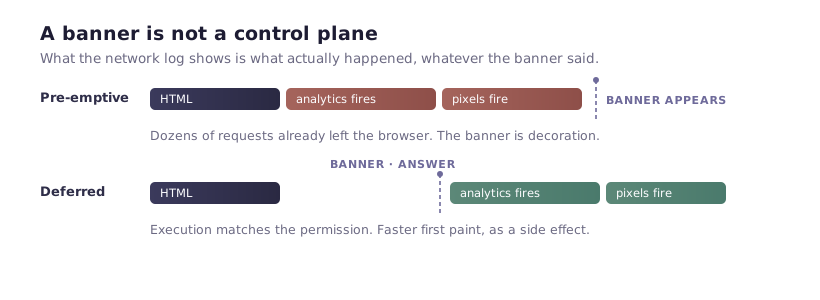
Most Webflow sites with a cookie banner are still non-compliant, and the reason is a misunderstanding about what a banner is. A banner is a user interface. It renders a dialog, stores a decision, and styles itself to match your brand. What it does not do — unless something else is wired up — is prevent Google Analytics from loading two hundred milliseconds before it appears on screen.
You can check this on your own site in about ninety seconds. Do that first, before reading any further, because the result decides how much of this article applies to you.
Ninety seconds to find out
- Open your published site in an incognito window, so no prior consent decision is stored.
- Open DevTools and go to the Network tab before the page loads.
- Filter the request list by
google-analytics.com, thengoogletagmanager.com, thenfacebook.net. - Reload, and do not touch the banner.
If any of those filters shows a request, that script ran without consent. On a site subject to GDPR, that is the entire problem in one screenshot.
The same check works for any vendor. The domains worth trying are connect.facebook.net for Meta Pixel, snap.licdn.com for LinkedIn, static.hotjar.com for Hotjar, and analytics.tiktok.com for TikTok.
Why this happens specifically on Webflow
Webflow gives you two places to put custom code: Project settings → Custom code → Head code, and the same panel's footer field. Anything you paste into the head field is written into the document head and parsed by the browser as part of the initial HTML. It executes during parse, before your banner's own JavaScript has necessarily initialised, and certainly before a visitor has had time to read anything.
That is not a Webflow bug. It is what a head script is for. The problem is that almost every analytics vendor's setup instructions say "paste this in the head of your site", those instructions were written without consent in mind, and Webflow's UI makes following them the path of least resistance.
Three further Webflow-specific details catch people out:
Staging domains behave differently from production. Sites published to a .webflow.io subdomain carry Webflow's own analytics. Testing consent behaviour there and concluding you are clean is a mistake — check the custom domain.
Embedded elements load third-party code on their own. A YouTube embed dropped into the Designer contacts Google before any consent logic runs, unless you use the privacy-enhanced domain or a click-to-play placeholder. The same is true of embedded maps and typeface services.
Interactions and lazy loading change execution order. A script that behaves during a hard reload can behave differently on client-side navigation, which is why the incognito hard-reload check above is the one that counts.
The three ways to actually gate a script
There is no fourth. Every consent product on the market is one of these, or a combination.
1. Rewrite the script tag so the browser refuses to execute it
You change type="text/javascript" to something the browser does not recognise as executable — conventionally type="text/plain" — and add an attribute marking which consent category it belongs to. The consent layer then rewrites the type back and re-inserts the node once permission exists.
<!-- Inert until consent: the browser will not execute an unknown type -->
<script type="text/plain" data-consent-category="analytics"
        src="https://www.googletagmanager.com/gtag/js?id=G-XXXXXXXXXX"></script>
This is reliable and easy to reason about. Its weakness is that it only covers scripts you control. Anything injected by a Webflow embed, or by another script at runtime, is untouched.
2. Let Google Tag Manager decide
If your tags already live in GTM, blocking belongs there. You define consent-gated triggers so a tag simply never fires until its category is granted, and GTM handles the ordering for you.
This is the cleanest option for marketing sites with more than two or three tags, because the alternative — hand-editing every snippet — stops scaling quickly. It is also the route that pairs with Google Consent Mode, which we cover in the Consent Mode checklist for agencies.
The catch: GTM itself loads before consent. That is by design and is fine, provided GTM is configured to fire nothing until permission arrives.
3. Gate execution at the app level
A consent app installed into your Webflow project can intercept known trackers before they run, using an ID you provide rather than a snippet you paste. This is how FlowAppz Cookie Consent handles Google Analytics: you supply the measurement ID in the app's Settings tab, and the app injects gtag only after the analytics category is granted. Nothing goes in your head code at all.
The trade-off is coverage. App-level gating handles the integrations the app knows about well, and unusual vendors still need approach 1 or 2.
The mistake that survives all three
Implementing blocking and then never re-checking.
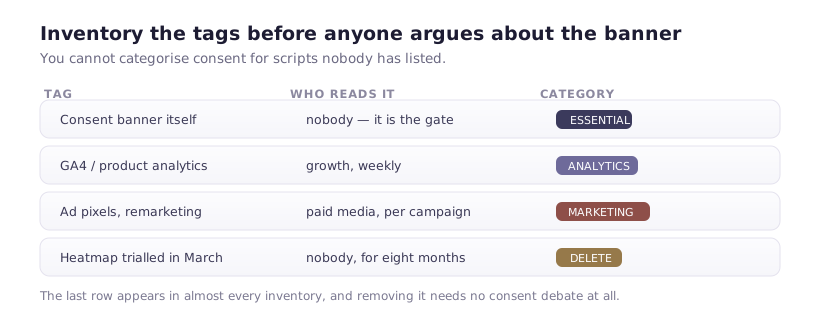
Consent gating is not a one-time task, because the thing it gates keeps changing. A marketer adds a LinkedIn tag directly to head code six weeks after launch. A client pastes a chat widget in. A new page embeds a video. Each of those quietly re-opens the hole, and nothing in Webflow warns you.
Put the ninety-second check from the top of this article into your launch checklist and your quarterly review. It takes less time than reading the ticket that would otherwise be filed about it.
What "granted" has to mean
One last thing worth stating, because it is the most common misreading of GDPR in practice: consent has to be an action. A banner that loads analytics on page view and only stops if someone clicks Reject is not consent — it is opt-out, and it does not satisfy the regulation for EEA visitors.
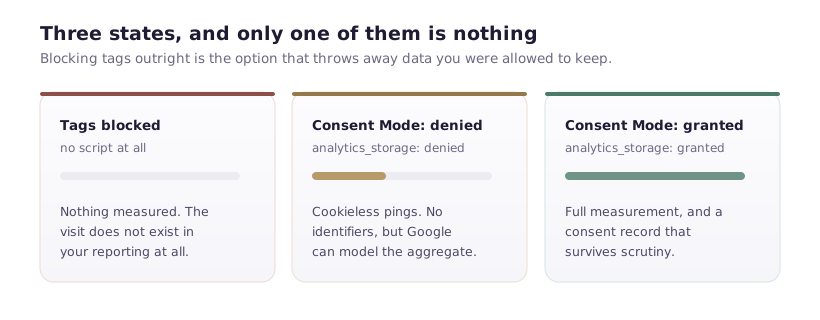
The default state before anyone clicks anything must be denied. If your implementation cannot demonstrate that in the Network tab, the banner's design is not the thing to fix first.
Where to go next
- Verify a working setup properly: how to check consent is actually being respected
- If your banner is behaving oddly: nine reasons a Webflow cookie banner stops working
- The configuration reference for script gating lives in the Cookie Consent scripts documentation