









Consent Mode and marketing tags on Webflow: a practical checklist for agencies
What Consent Mode means for a Webflow marketing site
Marketing teams often hear “Consent Mode” as a checkbox next to Google tags. In practice it is a contract between your banner, your tag configuration, and what the browser is allowed to signal before a visitor opts in. On Webflow, nothing about that contract is automatic: the site still loads your project scripts, embeds, and third-party widgets from Project settings → Custom code, components, and app injectors. If tags run before consent is recorded, you are not “almost compliant”—you are simply firing tags too early.
Agencies win when they treat Consent Mode as part of the release checklist, not a last-minute paste into the head tag. That means naming owners for tag inventory, default denied states, and how updates propagate when the client adds a new webinar tool in six months.
Inventory tags before you argue about the banner design
Start with a boring spreadsheet: every script that sets cookies, reads identifiers, or phones home to an ad or analytics network. Group them into the same categories you expose in the UI (essential, analytics, marketing, personalisation, etc.). For each row, note:
- Where it is injected (site-wide custom code, page-level embed, app, GTM container).
- Whether it can wait until after consent.
- Who requested it (client, growth team, legacy agency).
Webflow makes it easy to ship beautiful pages; it does not stop someone from pasting another snippet next week. Your checklist should say who approves new tags and how they are classified before they reach production.
Defaults: denied until proven otherwise
For many EU-facing builds, the safe engineering posture is: non-essential tags do not run until the visitor accepts the matching category. Consent Mode parameters on Google tags then reflect that posture in a way ad platforms understand—but the browser still should not execute heavy marketing scripts on first paint if your policy says they should wait.
Translate that to Webflow work:
- Avoid loading retargeting pixels in the head “just for speed” if your policy requires opt-in.
- If you use a tag manager, ensure triggers respect the same consent gates as your native Webflow banner state.
- Test in a clean profile and in an incognito window with third-party cookies restricted—what you see should match what your privacy policy claims.
Measurement without training your team on regret
When defaults are strict, marketing will ask whether conversions “still work.” Answer with a plan: which conversions are modeled, which depend on first-party data, and which campaigns need explicit acceptance rates. Document where key events are defined so a Webflow publish does not accidentally remove a data attribute your analyst relies on.
Where FlowAppz Cookie Consent fits in the stack
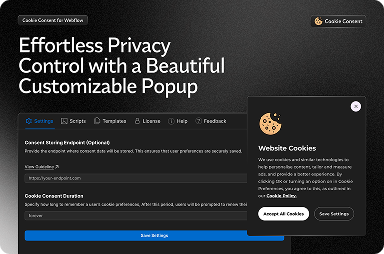
FlowAppz Cookie Consent is built for Webflow-first teams: categories, blocking, and presentation stay close to how you already ship sites. Pair it with a disciplined tag map and Consent Mode settings on eligible tags, and your Webflow project stops being a snowflake that only one developer understands.
Learn more on the Cookie Consent product page.
Handoff checklist you can paste into Notion
- Tag inventory approved and versioned.
- Non-essential scripts gated behind consent, verified in Network panel.
- Consent banner matches policy text and regional behaviour.
- Client knows how to request new tags and who signs them off.
Ship the boring parts first; the banner is only the visible edge of a deeper system.


