On this page
The part that goes wrong is never the content
Ask someone how a WordPress → Webflow migration went and you'll rarely hear that the posts didn't import. CSV export, field mapping, CSV import — it's a solved problem and usually the shortest phase.
What goes wrong is traffic. A site launches, looks better than the old one, everyone's pleased, and six weeks later organic sessions are down 40% with no obvious cause. The cause is almost always the same: URLs changed, redirects were partial or missing, and every link the old site had accumulated now points at a 404.
That's the failure this guide is organised around, because it's the expensive one. A delayed launch costs a week. A botched redirect map costs a year of link equity.
Scope it honestly before you start
The single most useful hour is spent working out what actually has to be rebuilt versus what moves as data.
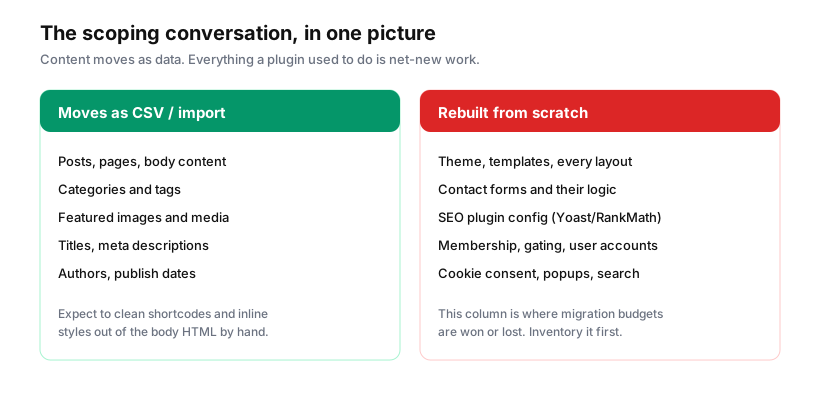
Content moves. Everything a plugin used to do is net-new work.
That right-hand column is where migration estimates go wrong. A WordPress site with twelve active plugins isn't a content project — it's twelve small feature builds wearing a trench coat. Contact forms with conditional logic, membership gating, a cookie consent banner, on-page search, an SEO plugin's redirect table, a review widget, multilingual content. Each is fine on its own. Together they're the bulk of the work.
So: open the plugins page on the old site, list every active plugin, and write next to each one whether Webflow does it natively, whether it needs an app or third-party service, or whether it's genuinely custom. Do this before quoting or committing to a date. A migration that budgets for content and forgets the plugin column is the one that overruns.
Two things I'd flag specifically because they're consistently underestimated:
Body content is messier than it looks. WordPress post bodies are full of shortcodes, inline styles, Gutenberg block markup and image tags pointing at the old domain. Imported raw, they render as literal [shortcode] text or broken layouts. Budget cleanup time proportional to post count — a few dozen posts is an afternoon; a thousand posts needs a script and a review pass.
Forms lose their history. Webflow's forms collect submissions going forward. Historical entries live in the old database and don't come with you. If anyone relies on that archive, export it before the old site is decommissioned, and connect the new forms to your CRM from day one rather than after launch.
Map every URL before you build anything
This is step one, and skipping it is the mistake that produces the traffic drop.
Crawl the existing site — Screaming Frog's free tier handles 500 URLs, which covers most marketing sites — and export the full list. Pull the top pages by organic traffic from Search Console and by sessions from Analytics, and pull your backlink profile from whatever tool you have.
Now you have three lists, and their union is what must survive. A page with no traffic and no backlinks can be retired. A page with fifty referring domains cannot, regardless of what anyone thinks of its content.
WordPress and Webflow structure URLs differently by default, so most of these will change:
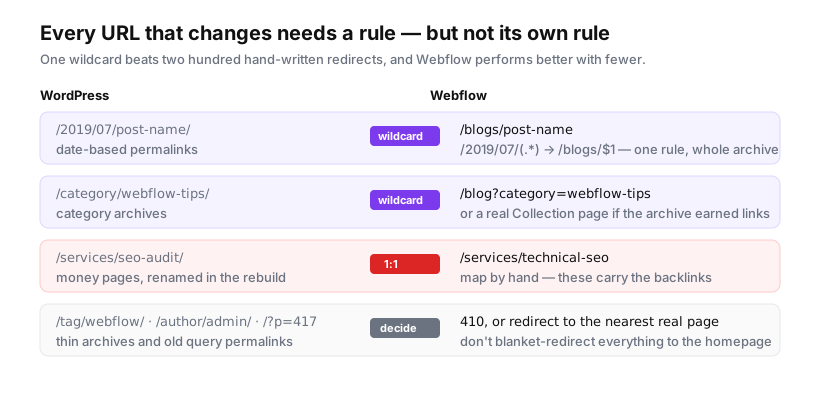
Webflow handles redirects in Site Settings → Hosting, and two features matter:
Wildcards. /2019/07/(.*) → /blogs/$1 moves an entire date-based archive in one rule. Webflow explicitly recommends preferring wildcards, and treats roughly 1,000 rules as a practical ceiling — every rule is data the site carries, and thousands of individual redirects have a genuine cost.
CSV import. Bulk import handles up to 1,000 rows per file; split larger sets into batches.
The working method: wildcards for anything that follows a pattern, hand-mapped 1:1 rules for your money pages, and a deliberate decision about the long tail.
On that long tail — tag archives, author pages, old ?p=417 permalinks, paginated archives — resist the urge to sweep it all to the homepage. Google treats a redirect to an irrelevant destination as a soft 404 and passes nothing, so you get the maintenance cost of a redirect with none of the benefit. Redirect to the nearest genuinely relevant page, or let it 404. A clean 404 for a page that no longer exists is an honest answer and a perfectly good one.
The sequence
Order matters more than speed here.
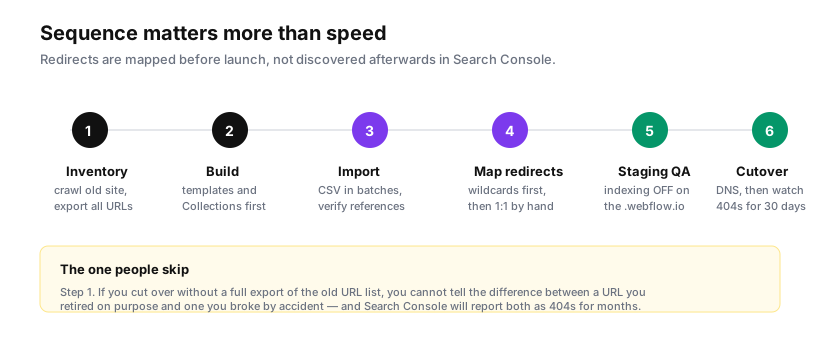
1. Inventory. Crawl, export, and combine with traffic and backlink data. Everything downstream depends on this list existing.
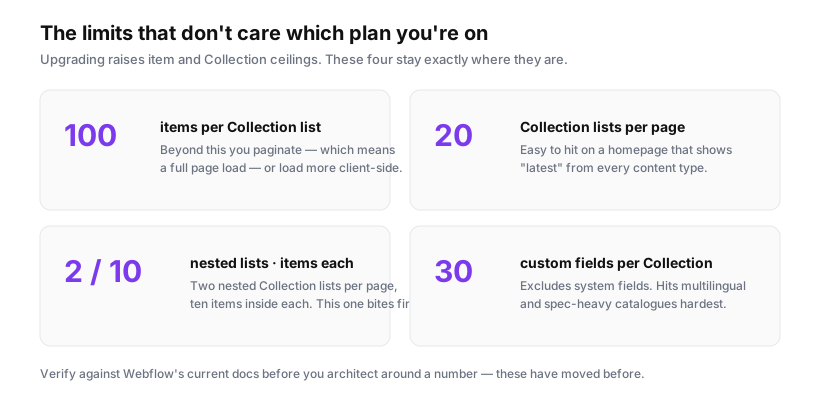
2. Build templates and Collections first. Model your content types before importing anything. Changing a Collection's structure after 800 items are in it is painful; changing it while empty is free. Think about field limits and list caps now — a Collection list shows 100 items without pagination, and nested lists cap at 10, which shapes category and archive designs.
3. Import in batches. Ten items, then check: did references resolve, did images come across, does the body HTML render cleanly? Fix the mapping, then run the rest. A bad import at scale has no undo.
4. Map redirects. Wildcards, then hand-mapped priority pages. Do this before launch, not after.
5. Staging QA with indexing off. Webflow's .webflow.io staging URL must have subdomain indexing disabled, or you publish a full duplicate of your site competing with the real one. Check every template, every breakpoint, every form actually delivering.
6. Cut over, then watch. DNS switch, then monitoring — daily for a fortnight.
Launch day, and the two weeks after
The launch itself is anticlimactic. The monitoring is where you catch what you missed.
Immediately:
- Submit the new sitemap in Search Console
- Confirm the new site is indexable — no leftover
noindex, no over-broad robots.txt disallow - Spot-check ten redirects manually, including two or three deep ones
- Verify analytics is firing and forms deliver to a real inbox
Daily for the first two weeks:
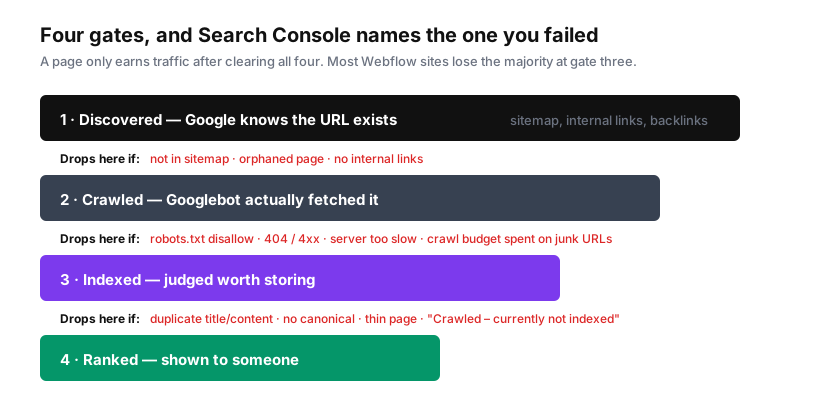
- Search Console → Pages → Not found (404). This is your miss list. Every URL appearing here that used to have traffic needs a redirect today, not next sprint.
- Crawl the new site for internal links still pointing at old paths — imported body content is full of them
- Watch Core Web Vitals: a redesign that ships a heavier hero can cost you the performance you had
Expect a dip. A modest, temporary drop in impressions after any large migration is normal — Google needs to recrawl, reprocess and re-evaluate everything, and that takes weeks, not days. What's not normal is a sustained decline past four to six weeks, or a drop concentrated on specific high-value pages. That's a redirect problem, and it's fixable if you catch it. Set a baseline export before you launch so you can tell the difference between "recrawling" and "broken", instead of arguing about it from memory.
Is it worth doing?
I'd rather be useful than promotional about this. Migrating is genuinely worth it when the WordPress site has become a maintenance burden — plugin conflicts, security patching, a theme nobody understands, marketing blocked on a developer for every change. Webflow's real value is that a marketer can ship a landing page on Tuesday without a deploy, and that the hosting, CDN and SSL stop being anyone's problem.
It's not worth it if your site depends on functionality Webflow doesn't do well. Complex e-commerce with deep inventory logic, membership systems with real permissions, applications with user-generated content, anything needing tens of thousands of frequently-changing CMS items. You can force these, and people do, but you'll spend the next two years working around a tool you chose for reasons that stopped applying.
The middle path is underused: keep Webflow for the marketing site, where it's excellent, and serve the application or data-heavy section from a subdomain running something built for it. That's often the honest answer for a business that wants marketing agility without pretending its product is a brochure.
Whatever you decide, decide it before the migration rather than halfway through. The most expensive migrations are the ones where the scope was discovered in flight.
Sources: Webflow: migrate from WordPress · Webflow: import/export 301 redirects · Google Search Central: site moves with URL changes