Step 1: Get Your Webhook Endpoint URL
To store cookie consent data, you need your own webhook endpoint URL.
Use an endpoint you control, such as:
- Your backend API
- A workflow automation endpoint
- Any webhook receiver you manage
Step 2: Copy Your Webhook URL
Copy the webhook endpoint URL you want to use for receiving consent data.
This can be:
- Your own API endpoint
- A webhook automation service
- A webhook receiver you control
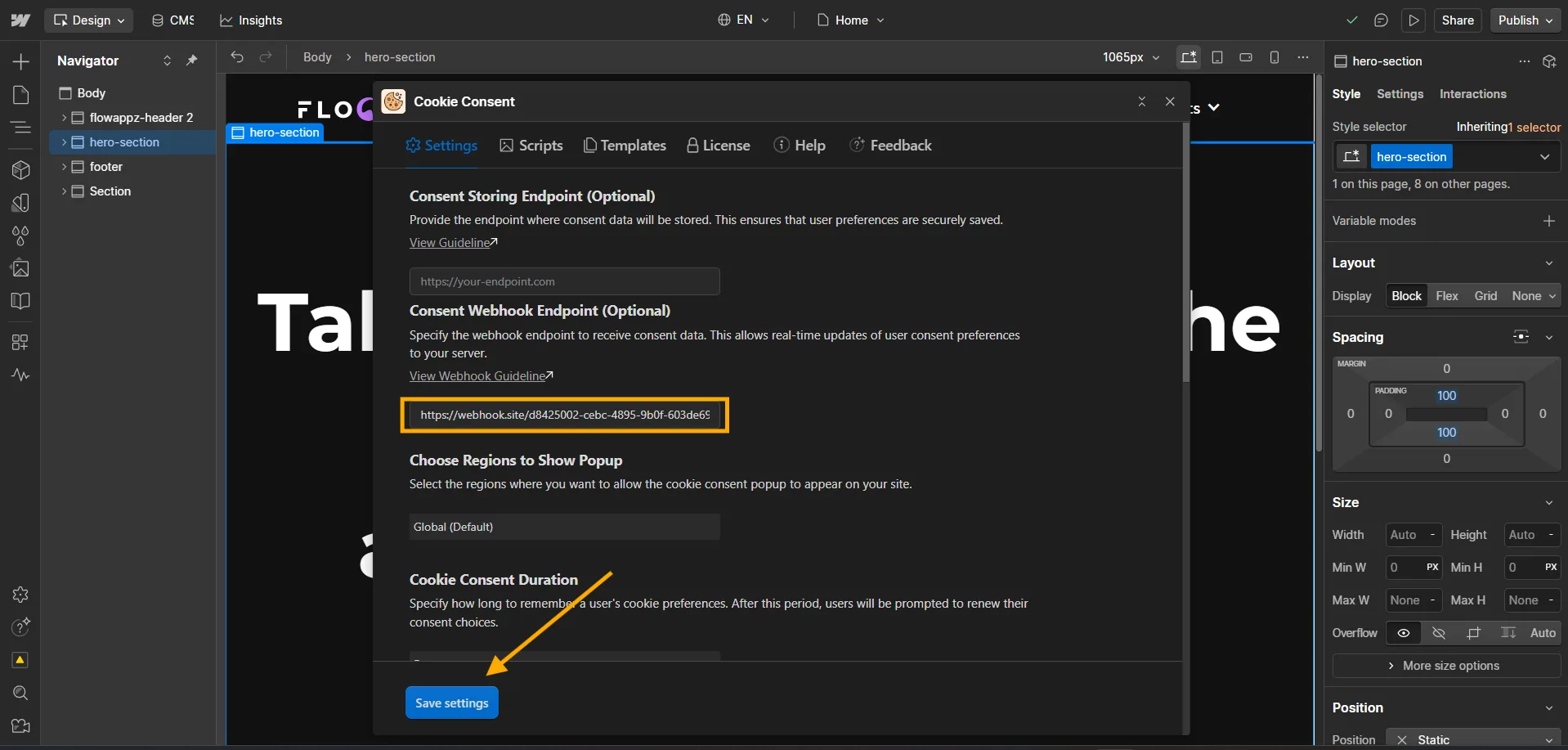
Step 3: Configure Your Cookie Consent App
- Open your Cookie Consent App inside the Webflow Designer.
- Navigate to the Settings tab.
- Find the Consent Storing Endpoint field.
- Paste your webhook endpoint URL.
- Click Save Settings.
Step 4: Publish and Verify
Publish your Webflow site and interact with the cookie consent banner.
Your Cookie Consent app will send the consent data to the configured webhook endpoint whenever a visitor submits their preferences.