On this page
Two different jobs
Webflow CMS is a publishing system. Content lives in Webflow, editors work in the Editor, published items render as static HTML at publish time. Fast, simple, no moving parts between the data and the page.
Airtable-synced means your content lives in Airtable and something copies it into Webflow — a native integration, Zapier, Make, or a script against the CMS API. Airtable is the source of truth; Webflow is the display layer.
The second exists because Airtable is a much better database than Webflow's CMS: real views, filtering, formulas, rollups, linked records without a ten-item rendering cap, and a grid interface that non-technical teams already understand.
But you're adding a synchronisation layer between your data and your website, and every sync is a thing that can fail, lag, or silently drift.
When Airtable is clearly better
The data already lives there. If your team runs its directory, event schedule or product catalogue in Airtable, and the website is one consumer among several, syncing beats duplicating. Duplicated data diverges — always.
Non-linear editing. Bulk edits, filtered views, sorting by six columns, copy-paste from a spreadsheet. Webflow's Editor is built for editing one item well, not for wrangling four hundred.
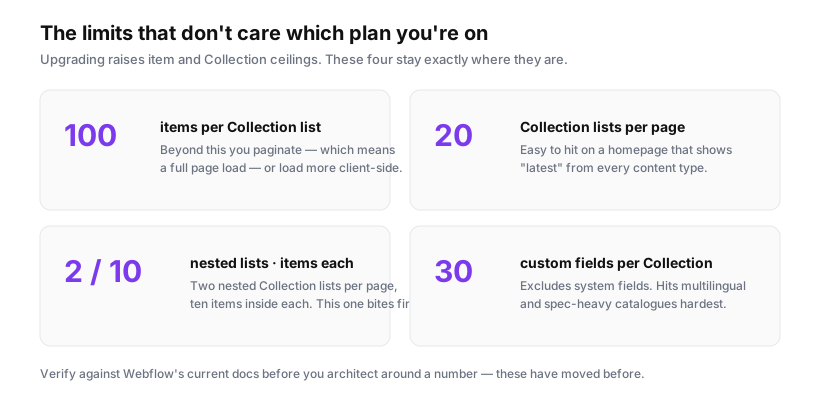
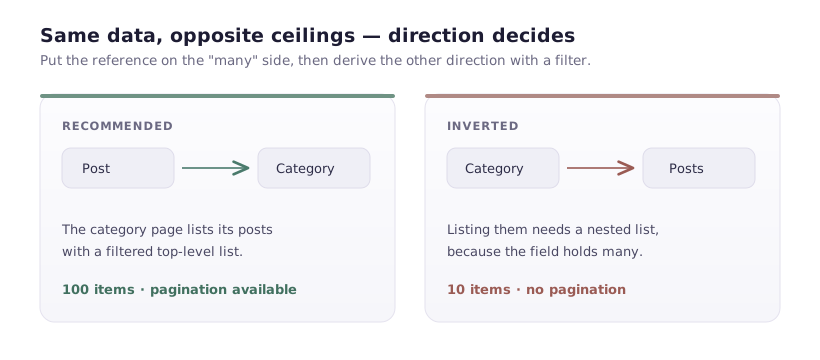
Complex relationships. Rollups, lookups, formula fields. Webflow has none of this, and a nested Collection list showing linked records caps at ten items.
Data feeding more than the website. If the same records drive a Slack bot, an internal dashboard and the site, they should live somewhere designed to be queried.
When Webflow CMS is clearly better
Editorial content with a publishing workflow. Blog posts, case studies, landing pages. Rich text, images, drafts, scheduled publishing. Airtable's long-text fields are a poor substitute for a rich text editor, and converting markdown to Webflow rich text through a sync is a job nobody enjoys.
Content tied to layout. When the person writing also decides how it looks, keeping content in the tool that renders it removes a whole class of problem.
Anything under a few hundred items with simple structure. The sync overhead isn't worth it. Add the Collection and move on.
When failure must be impossible. No sync means nothing to break at 3am.
The sync problems people discover late
Worth knowing before you commit, because each one has bitten real projects.
Rate limits and item ceilings. Webflow's CMS API is rate limited, and your Site plan caps total CMS items. A sync pushing thousands of records will hit both. When it does, writes start failing while the site looks perfectly healthy — the failure is in the integration logs, which nobody reads until someone asks why the last forty items never appeared.
Sync lag. Native integrations and automation tools sync on a schedule or on triggers, not instantly. Someone edits Airtable and asks why the site hasn't changed. The honest answer — "somewhere between one minute and one hour" — is not what they expect.
Deletes are the hard case. Most syncs handle creates and updates well. Deletion is where implementations diverge: some remove the Webflow item, some leave an orphan, some fail silently. Orphaned items are live URLs for content the business believes it removed. Test deletion explicitly before you trust the pipeline.
Rich text mangling. Airtable long text is plain or markdown; Webflow rich text is structured HTML. Conversion through a sync loses formatting, breaks links, or produces markup that doesn't match your styles. Any project whose main content is long-form prose will fight this constantly.
Images. Airtable attachment URLs expire. A sync copying the URL rather than the file produces images that work for a while and then break — sometimes months later, which makes diagnosis miserable. Ensure the file is uploaded to Webflow, not just linked.
Nobody owns it. Sync breaks quietly. Six weeks later someone notices the site is stale. Whoever owns the sync needs alerting on failures, not a monthly glance.
A decision framework
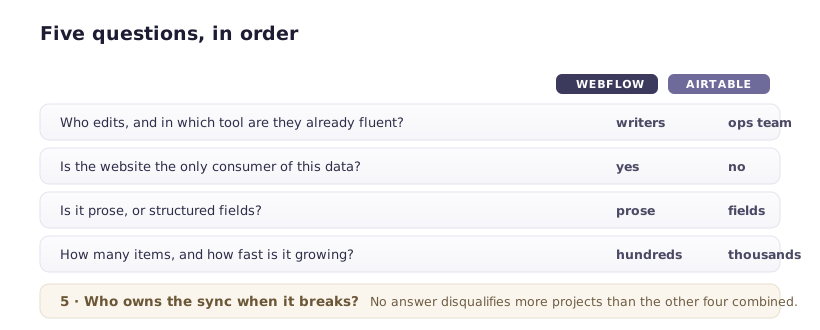
Five questions, in order:
- Who edits, and in what tool are they already comfortable? Marketers writing prose → Webflow. An ops team maintaining records → Airtable.
- Is the website the only consumer? Yes → Webflow. No → Airtable.
- How many items, and how fast is it growing? Under a few hundred and stable → Webflow. Thousands, or growing → check your item ceiling either way, and prefer Airtable for the editing experience.
- Is the content prose, or fields? Prose → Webflow. Structured fields → either, and Airtable if relationships are complex.
- Who owns the sync when it breaks? No answer → don't build a sync.
Question 5 disqualifies more projects than the other four combined, and it's the one that gets waved through in the kickoff meeting.
The hybrid worth considering
You don't have to choose one for the whole site.
Blog and case studies in Webflow CMS, where prose and publishing workflow matter. Product catalogue or event listings synced from Airtable, where structured data and bulk editing matter.
Two systems, each doing what it's good at. The cost is two places to look when something's wrong — which is a real cost, but a smaller one than forcing all your content through the wrong tool.
If you go with a sync
- Alert on failure, to a channel a person watches. Not email.
- Monitor item count against your plan ceiling, at 80%.
- Test deletion, not just create and update.
- Upload images to Webflow rather than linking Airtable URLs.
- Write down the direction of truth and enforce it. If someone edits an item in the Webflow Editor and the next sync overwrites it, that person will be confused and annoyed — put a note in the Collection description saying edits belong in Airtable.
- Know your recovery path. If the sync writes bad data to four hundred items, what undoes it? There's no bulk undo in Webflow. A dated export you can re-import is the difference between an hour and a week.