On this page
The decision before the field type
A multi-reference field links one item to many items in another Collection. A post to several tags. A project to several services. A recipe to several ingredients.
Before you add one, ask whether the thing you're linking to needs a page of its own.
If yes — tags that should have /tags/webflow archive pages, authors with bio pages, services with landing pages — you need a Collection and a reference field. That's what they're for.
If no — a "Difficulty: beginner / intermediate / advanced" label that will never be anything but a label — use an option field instead. It's simpler, it doesn't consume a Collection slot, it can't drift out of sync, and it doesn't drag in the nested-list limits described below.
The failure mode I see most often is a Collection created for something that will never be a page: "Colours" with six items, referenced from Products, purely to render a swatch. That's an option field wearing a costume, and it costs you one of your Collection slots for the life of the project.
Three limits that shape the model
Decide these before you build, because each is painful to discover later.
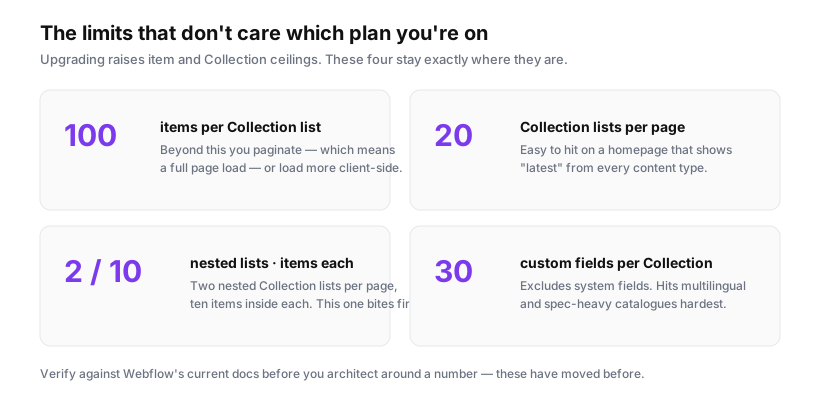
Rendering caps at 10. A multi-reference field displayed in a Collection list is a nested Collection list, and nested lists render ten items. A post with fifteen tags shows ten, silently. No error, no indicator.
Two nested lists per page. If your item template already nests one thing, you have exactly one more nesting slot on that page.
Thirty custom fields per Collection. Multi-reference fields count. Model-heavy Collections run out faster than people expect.
Practical consequence: multi-reference is excellent for a handful of related items and poor for anything that could grow long. Tags on a blog post — fine, nobody sensibly uses fifteen. Ingredients on a recipe — risky. Products in a category — model it the other way round.
Direction matters more than people think
A reference relationship has a direction, and picking the wrong one is the most common structural mistake.
Say you have Posts and Categories. Two options:
Post has a reference to Category — the natural direction. On a Category page, Webflow can list "all Posts where Category = this one", using a top-level Collection list with a filter. That gets you the 100-item ceiling and pagination beyond it.
Category has a multi-reference to Posts — the inverted direction. Now listing posts on a Category page means rendering a nested list, capped at ten, with no pagination.
Same data, same pages, wildly different ceilings. The rule: put the reference on the "many" side. Each post points at its category; the category doesn't hold a list of posts. Then use filtered Collection lists to show the relationship from the other direction.
Multi-reference is for genuine many-to-many relationships where both sides can have several — a post with several tags, where each tag has many posts. Even then, list the posts on a tag page with a filtered top-level list, not a nested list from the tag item.
Building it
In the Designer. Add the field to your Collection (Settings → Fields → Multi-reference), pointing at the target Collection. On the item template, add a Collection list bound to that field, and inside it, whatever markup each linked item needs.
Post template
└── Collection list (bound to Tags multi-reference)
    └── Link block → /tags/{{ slug }}
        └── Text → {{ name }}
Making tags link somewhere. If Tags is a real Collection with a Collection page, each tag links to its own archive. Set the link block's URL to the tag's page. If you skipped the Collection page, your tags are text — and you've lost most of the reason to model them as a Collection at all.
Related posts by shared tag is the request that follows within a week. Webflow can't natively filter "posts sharing a tag with this post" — Collection list filters can reference the current item's fields, but not a set intersection. Options in ascending order of effort:
- Link related posts by hand with a second multi-reference field ("Related posts" → Posts). Editorially controlled, no code, capped at ten. For most blogs, this is the right answer and takes ten seconds per post.
- Filter client-side: render a wider list and narrow it in JavaScript by comparing tag slugs.
- Precompute relationships outside Webflow and write them back via the CMS API.
Option 1 is unfashionable and usually correct. Editors picking three genuinely related posts beat any automatic tag intersection, which reliably surfaces the least relevant post that happens to share a generic tag.
Importing items with references
This is where bulk work goes wrong, so it's worth being precise.
When importing a CSV with a reference column, the referenced items must already exist, and Webflow matches them by name or slug. Import order matters:
- Import Categories and Tags first.
- Verify they're published — draft items may not match.
- Then import Posts with the reference columns filled.
For a multi-reference column, separate values with commas: webflow, seo, cms. Match must be exact — trailing spaces and case differences cause silent misses, where the item imports successfully with an empty reference field.
Test with five rows before running four thousand. Check the references actually populated, not just that the import reported success. There is no undo for a mass import, and unpicking three thousand items with empty references is significantly worse than the import.
Multi-reference and filtering
A practical note that saves an afternoon: if you're filtering a grid by a multi-reference field client-side, you can't read the linked values from a single attribute, because Webflow has no way to join them into an attribute value.
Render them into hidden elements and collect them on load:
<div class="item" data-tags="">
  <div class="tags" hidden>
    <span class="tag">{{ tag-slug }}</span>
  </div>
</div>
document.querySelectorAll('.item').forEach(item => {
  item.dataset.tags = [...item.querySelectorAll('.tag')]
    .map(t => t.textContent.trim())
    .join(' ');
});
And remember the ten-item cap applies here too — an item with more than ten tags will filter incorrectly, because the eleventh tag was never rendered for JavaScript to find.
A model that holds up
For a blog with authors, categories and tags, the arrangement that survives:
- Posts — reference to Author (single), reference to Category (single), multi-reference to Tags (a handful), multi-reference to Related Posts (optional, editorial).
- Authors, Categories, Tags — each a Collection with a Collection page, each listing its posts via a filtered top-level Collection list.
Every "list of posts" is a top-level list with 100 items and pagination. Every nested list holds a genuinely small set — a post's tags, an item's related links. Nothing depends on a nested list staying under ten by luck.
That's the whole trick: nest only what is naturally short, and derive everything long from a filtered list on a page of its own.