On this page
The symptom
A category page shows ten products. The Collection has thirty. Nothing errors, the Designer looks fine, publishing changes nothing, and the eleventh item is simply not there.
If that's what you're seeing, you almost certainly have a nested Collection list, and you've hit a platform limit rather than a bug in your build.
Confirm it in thirty seconds
Webflow has two different things people call a "Collection list", and the limits are completely different:
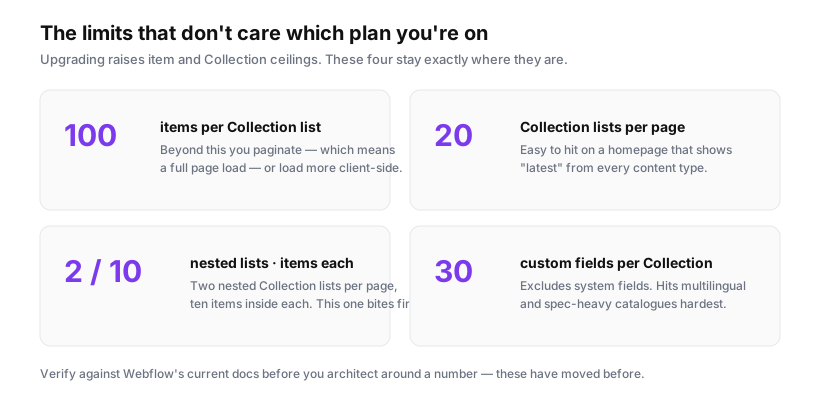
A top-level Collection list sits directly on the page, bound to a Collection. It renders up to 100 items, and you can page beyond that.
A nested Collection list sits inside another Collection list, bound to a reference or multi-reference field on the parent item. Think Products inside Category, Lessons inside Course, Tags inside Post. It renders 10 items, full stop. There is no pagination, no "load more", and no setting to raise it on standard plans.
So: open your page in the Designer and look at the Navigator. If the list showing ten items is indented inside another Collection list, that's your answer. If it's at the top level and stopping at ten, check the list's Settings panel — someone has probably set a manual item limit, which is a different and much easier fix.
Two related caps worth knowing while you're here, because they bite the same designs: two nested Collection lists per page, and 20 Collection lists per page in total.
Why it's silent
This is the genuinely frustrating part, and it's worth understanding rather than just working around.
Webflow renders CMS content at publish time. The nested list is resolved for each parent item, capped at ten, and written into the static HTML. There is no runtime query that could report "showing 10 of 30" — by the time a browser sees the page, the other twenty were never there.
Which means: no console error, no Designer warning, no difference between a category with 8 items and one with 80. It works perfectly during a build with test data and silently truncates the day someone adds the eleventh item, typically months later.
If you take one thing from this: when you model nested content, ask what the maximum realistic child count is. If the answer is "more than ten, eventually", don't nest.
The four ways out
1. Restructure to a top-level list with a filter
The most common fix. Instead of Categories with nested Products, build a Products page with a top-level Collection list — which gets you 100 items — and filter it by category.
Two ways to do the filtering. Either build a real Collection page per category, letting Webflow's own filtering handle it (Products where Category = current), or use one page with client-side filters.
The Collection page route is usually better: /categories/lighting is a real, indexable URL with its own metadata, which is worth having anyway. Nested lists produce no URLs at all.
Cost: a restructure, and possibly a URL change with redirects. Benefit: a genuine 10× headroom and indexable category pages.
2. Let JavaScript fetch the rest
Keep the nesting for the first ten and load the remainder from the category's own page:
// On a category page, pull the full product list from that category's
// collection page and replace the truncated nested list.
async function expand(container, categoryUrl) {
  const res = await fetch(categoryUrl);
  const html = await res.text();
  const doc = new DOMParser().parseFromString(html, 'text/html');
  const full = doc.querySelectorAll('.product-item');

  if (full.length > container.children.length) {
    container.innerHTML = '';
    full.forEach(node => container.appendChild(node));
  }
}
This is what several CMS libraries do under the hood. It works, and it has real costs: an extra request per expanded list, a flash of ten items before the rest arrive, and items that crawlers may not see because they don't exist until JavaScript runs. Fine for an interactive dashboard-ish page; poor for anything you want ranking.
3. Duplicate the nested list and offset it
The trick people discover on the forum: add a second nested Collection list for the same field, and set its start offset to 10. Now you show 20. A third gets you 30.
It works. It's also the worst option on this list, and I'd only use it as a stopgap. You're limited to two nested lists per page, so the ceiling is 20 anyway; the offsets are hardcoded, so item 21 silently vanishes exactly like item 11 did; and you've now got duplicate markup to keep in sync when the card design changes. It converts a silent failure at 10 into a silent failure at 20.
4. Accept the limit and design for it
Sometimes ten is fine, and the honest move is to say so in the interface rather than pretend the list is complete.
Show ten and link to the full set: "Showing 10 of 34 — view all lighting products". That's a better experience than an infinite scroll of accessories, it's one link in the Designer, and it creates an internal link to a page that wants the traffic.
You can't render the true total from a nested list, but you can put a count field on the parent item and update it — either by hand for a small catalogue, or via the CMS API if something already syncs your data.
Choosing between them
| Situation | Do this |
|---|---|
| Under 10 children, always | Nothing. Nesting is correct. |
| 10–100, needs indexing | Restructure to Collection pages (option 1) |
| 10–100, interactive UI only | Client-side fetch (option 2) |
| Over 100 | Split the Collection, or paginate |
| Deadline tomorrow | Option 4 — show ten, link to all |
The one I'd push back on hardest is option 3. It looks like the cheapest fix and it's the one that reproduces the original bug at a slightly higher number.
Preventing the next one
When you model content, write down the expected maximum for every parent-child relationship. Anything that could plausibly exceed ten children shouldn't be a nested list — make it a Collection page relationship instead. That decision is free at the modelling stage and expensive six months in, when the restructure means URL changes, redirects and a rebuilt template.
And if you inherit a site, it's worth ten minutes to grep your published pages for nested lists whose parent items have more than ten children. Every one of those is a page quietly showing incomplete content to customers.