On this page
What exporting actually gives you
Webflow lets you export a site's HTML, CSS, JavaScript and assets as a static bundle you can host anywhere. It's a genuine escape hatch, and people reach for it for four reasons: performance control, hosting cost, wanting the code in version control, or needing to integrate with a stack Webflow can't reach.
All four are legitimate. The problem is that the export removes several things people assume travel with it, and the discovery usually happens after launch.
What stops working the moment you export
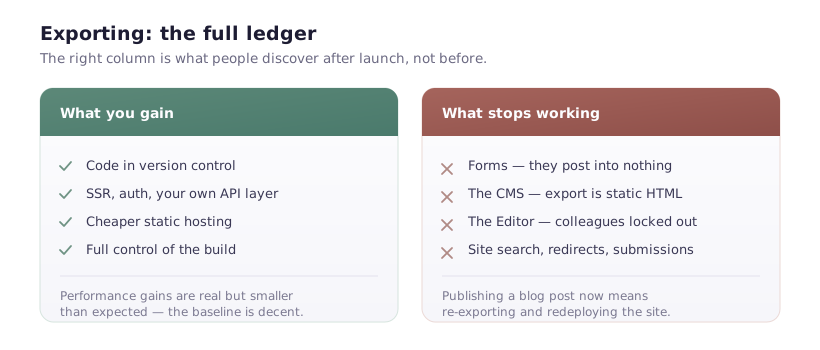
Forms. Webflow's form handling is a hosting service. Export the site and your forms post into nothing. The markup is intact, the submit button works, no submission ever arrives. This is the single most common post-export surprise, and it's silent — no error, no console message.
You'll need to point each form at your own endpoint: Netlify Forms, Formspree, a serverless function, whatever fits.
The CMS. This is the big one. Exported CMS content is static HTML at the moment of export. Collections don't come with you; there is no CMS in the export. Publishing a blog post now means re-exporting the whole site and redeploying.
For a site with any regular content, this is usually disqualifying on its own.
The Editor. Non-technical colleagues lose the ability to change anything. Every copy tweak becomes a developer task.
Site search. Webflow's built-in search is a hosted feature. Gone.
Password protection and 301 redirects managed in Webflow's hosting settings. You'll reimplement redirects at your new host.
Form submission storage, and the submissions history already collected.
What you gain, honestly assessed
Performance control — real but smaller than expected. Webflow's hosting is already on a global CDN with sensible caching, and images already get responsive variants and WebP. You can beat it — better cache headers, your own build pipeline, removing Webflow's JavaScript if you don't use interactions — but you're competing with a decent baseline, not a bad one. Expect meaningful gains only if you're actively optimising.
Removing jQuery. Webflow ships jQuery for interactions. If your site doesn't use them, the export lets you strip it. You can also disable it within Webflow, so this isn't unique to exporting.
Version control. Code in git, reviewable diffs, rollback. Genuinely valuable for engineering teams and unavailable otherwise.
Integration freedom. Server-side rendering, your own API layer, authentication, whatever your stack needs. This is the strongest argument and the one that actually justifies exporting.
Hosting cost. Static hosting on Netlify, Vercel or Cloudflare Pages is cheap or free versus a Webflow Site plan. For a brochure site with no CMS, that adds up.
The maintenance question nobody asks first
Here's what determines whether this works long-term: after exporting, where do design changes happen?
Two answers, and both have a sting.
Keep designing in Webflow and re-export. Straightforward, but every export overwrites your customisations. Changed form endpoints, added scripts, adjusted markup — gone, unless your build pipeline reapplies them. Teams solve this with a post-export script that patches the bundle. That script is now infrastructure you maintain.
Stop using Webflow and edit the exported code. Now you have a static site and a front-end developer's job. Which is fine if that's what you wanted, but you're no longer getting anything from Webflow and should stop paying for the Workspace.
The uncomfortable middle — designing in Webflow while also hand-editing exports — is where these projects go wrong. Changes diverge, nobody knows which version is authoritative, and the Webflow project drifts into being a stale mockup.
When exporting is right
- A marketing site with no CMS content and no forms, or forms you're happy to rewire once.
- You need SSR, authentication, or deep API integration that Webflow can't do.
- You have engineers who will own the pipeline, and a documented re-export process.
- The design is stable. Exports cost most when the design changes weekly.
When it isn't
- You publish content. A blog, case studies, anything CMS-driven. Re-exporting to publish a post is a workflow nobody sustains.
- Non-technical people update the site. You're removing the main reason Webflow was chosen.
- You're exporting purely for a Lighthouse score. Fix the images, fonts and third-party scripts first — that's where the seconds are. A well-tuned Webflow site outperforms a carelessly exported one.
- Nobody owns the deployment. A static bundle with no owner rots.
The middle path most teams should take
Keep Webflow hosting for the marketing site and CMS, where it's genuinely good, and run anything needing a real backend on a subdomain with its own stack.
example.com on Webflow — marketing pages, blog, editors publishing without a deploy. app.example.com on your own infrastructure — the product, authentication, whatever needs SSR.
You keep publishing velocity where it matters and engineering control where you need it, without pretending one tool should do both. It's less satisfying than a single stack, and it's the arrangement I see working in practice.
If you do export
- Rewire every form and test one submission per form before you switch DNS.
- Write down the re-export process, including anything you patch afterwards.
- Set up redirects at the new host — export doesn't carry them.
- Check your sitemap and robots.txt; the export may not match what Webflow was serving.
- Keep the Webflow project alive if you'll re-export, and be explicit about which is the source of truth.
That last point is the one that decides whether this is a clean migration or a slow-motion divergence.