On this page
Why this is worth half an hour
Third-party scripts accumulate. A campaign adds a pixel, a trial adds a heatmap, an experiment adds a testing tool, marketing switches analytics vendors and the old snippet stays. Nobody removes anything, because nobody is certain what's safe to remove.
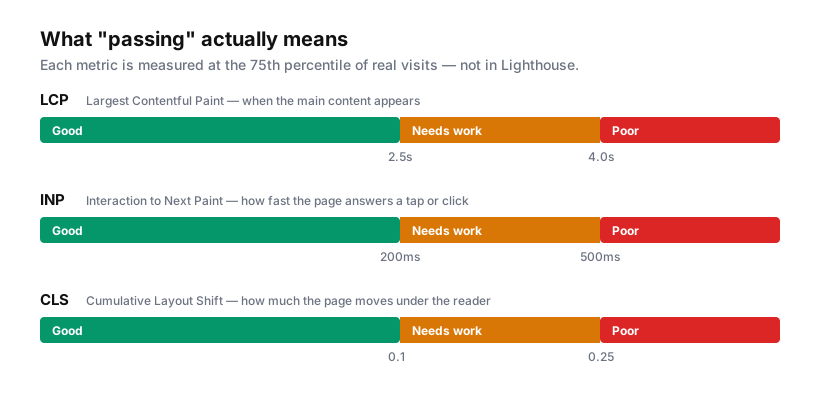
The result is a site carrying six to twelve third-party scripts, of which perhaps four earn their place. They are usually the largest contributor to poor INP, because third-party JavaScript competes with your page for the main thread.
The blocker is rarely technical. It's that no one has an inventory, so every conversation ends at "better leave it, someone might be using it". This gets you the inventory.
Step 1: list what loads (5 minutes)
DevTools → Network → hard reload → sort by Domain. Or run this in the console:
const own = location.hostname;
const third = performance.getEntriesByType('resource')
  .filter(r => {
    try { return new URL(r.name).hostname !== own; } catch { return false; }
  })
  .map(r => ({
    host: new URL(r.name).hostname,
    kb: Math.round(r.transferSize / 1024),
    ms: Math.round(r.duration),
    type: r.initiatorType,
  }))
  .sort((a, b) => b.kb - a.kb);

console.table(third);
console.log('total third-party KB:', third.reduce((s, r) => s + r.kb, 0));
That's your inventory with sizes. Run it on the homepage and on one deep page — some scripts load only on certain templates.
Step 2: find where each is injected (10 minutes)
For each domain, find who added it. Four places to look on a Webflow site:
- Site Settings → Custom Code — head and footer, applies site-wide
- Page Settings → Custom Code — per page
- Embed elements in the Designer — easy to miss, so search your pages
- Google Tag Manager — if GTM is present, it's probably injecting several of the entries above
GTM deserves specific attention. In the Network panel it's one modest request; in reality it's a container that can inject a dozen tags. Open the container, list every tag, and note which fire on all pages.
Write down, for each script: what it is, who asked for it, which team looks at its data, and when it was added. The last column is the useful one — anything over two years old with no identifiable owner is almost certainly dead weight.
Step 3: measure the main-thread cost (10 minutes)
Size is the wrong metric for INP; execution time is what matters. A 40KB script that runs for 300ms is worse than a 200KB one that runs for 20ms.
DevTools → Performance → record a reload → open the Bottom-Up tab and group by URL. That gives you scripting time per domain.
Or, quicker, use long task attribution:
new PerformanceObserver(list => {
  list.getEntries().forEach(task => {
    if (task.duration > 50) {
      console.warn(`Long task: ${Math.round(task.duration)}ms`,
        task.attribution.map(a => a.containerSrc || a.name));
    }
  });
}).observe({ type: 'longtask', buffered: true });
Anything over 50ms blocks interaction. A cluster of long tasks attributed to one third-party domain is your headline finding.
Step 4: decide, one script at a time (5 minutes)
For each entry, exactly one of four outcomes. Don't allow a fifth.
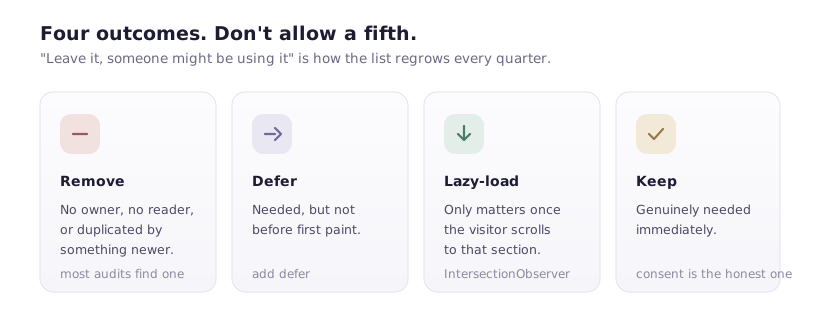
Remove. No owner, no consumer, or duplicate of something else. Most audits find at least one analytics tool nobody has opened in a year.
Defer. Needed, but not before first paint. Add defer, or load on idle.
Lazy-load. Only relevant once a visitor reaches a section — maps, review widgets, embeds. Load on scroll.
Keep as is. Genuinely needed immediately. Consent management is the honest example: it has to run before the things it gates.
Write the outcome next to each script. A decision recorded is what stops this list regrowing next quarter.
The removal conversation
The reason dead scripts survive is social, not technical, so it's worth having the argument ready.
"Marketing might need it." Ask when they last opened it. If nobody can name a report, it isn't in use. Removing it is reversible in five minutes; the cost of keeping it is paid by every visitor on every page load.
"It's only 30KB." Size isn't the cost. Show the long-task measurement — 30KB that executes for 200ms on a mid-range phone is a real delay on every interaction.
"We'll need it again next quarter." Then add it next quarter. Snippets are one paste.
A useful framing: every script is a small ongoing tax on every visitor, paid in exchange for something. If nobody can name the something, stop paying.
After the audit
Re-measure. Run the step 1 snippet again and compare totals. A typical first audit removes 30–50% of third-party bytes, which is worth reporting to whoever approved the work.
Write it down. A short page listing each script, its owner, and why it's there. This is what makes the next audit ten minutes instead of thirty.
Put a gate on additions. Not bureaucracy — one question: what does this do, who reads its output, and does it need to run before the page paints? Scripts that can't answer all three go through the deferral pattern by default.
Re-run quarterly. Fifteen minutes. Sites regrow scripts the way drawers regrow cables.
The one that surprises people
Check whether your consent banner is loading tags before consent is given.
It's common to find analytics firing on page load with the banner appearing afterwards. That's both a compliance problem and a performance one — you're paying the main-thread cost of scripts that shouldn't have run yet. Fixing it improves both at once, which makes it the easiest thing on this list to get approved.