On this page
What an embed actually costs
Drop a YouTube embed on a page and you haven't added a video — you've added an iframe that loads its own HTML, its own JavaScript, its own CSS, and several network round trips to domains you don't control. A single YouTube embed commonly pulls well over half a megabyte before anyone presses play. Google Maps is comparable. Typeform, Calendly, review widgets, Spotify players: same shape.
Three separate costs, and it's worth separating them because the fixes differ:
Network. Requests competing with your own assets for bandwidth during load.
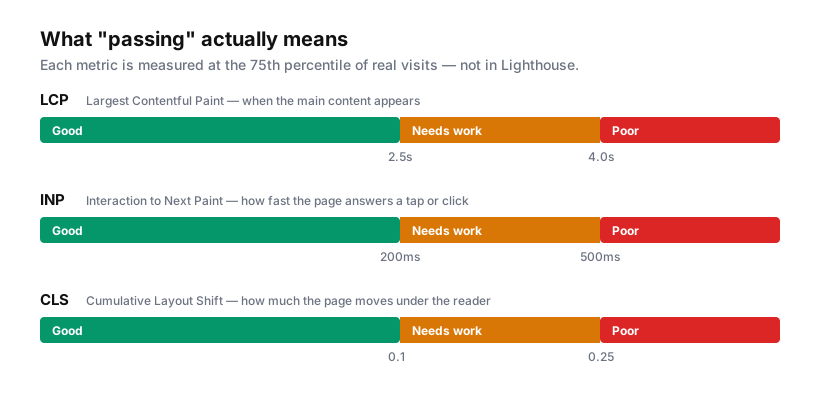
Main thread. Third-party JavaScript parsing and executing — this is what damages INP, because a busy main thread can't respond to taps.
Layout. Embeds that load, measure themselves and resize, shifting everything below them. That's CLS.
The good news is that embeds are the easiest heavy thing to defer, because almost none of them need to exist before the visitor scrolls to them.
The wrong fix first
loading="lazy" on the iframe is the obvious move, and it is worth doing:
<iframe src="https://www.youtube.com/embed/VIDEO_ID" loading="lazy"></iframe>
But understand what it does. Native lazy loading defers the iframe until it approaches the viewport — with a generous margin, often a couple of thousand pixels. On a typical marketing page, an embed a screen and a half down is inside that margin and loads anyway. It helps on long pages and does very little on short ones.
It also doesn't help at all with the embed you actually care about: the one above the fold.
The façade pattern
The technique worth learning. Instead of the embed, render a cheap placeholder that looks like the embed. Load the real thing on click.
For video, the placeholder is the poster image plus a play button. That's one image request instead of half a megabyte of player, and the visitor sees the same thing.
<div class="video-facade" data-video-id="VIDEO_ID" style="aspect-ratio:16/9">
  <img src="/images/video-poster.webp" alt="" loading="lazy">
  <button type="button" aria-label="Play video">▶</button>
</div>
document.querySelectorAll('.video-facade').forEach(facade => {
  facade.addEventListener('click', () => {
    const id = facade.dataset.videoId;
    const iframe = document.createElement('iframe');
    // youtube-nocookie avoids setting cookies until playback begins
    iframe.src = `https://www.youtube-nocookie.com/embed/${id}?autoplay=1`;
    iframe.allow = 'accelerometer; autoplay; encrypted-media; picture-in-picture';
    iframe.allowFullscreen = true;
    iframe.style.cssText = 'width:100%;height:100%;border:0';
    facade.replaceChildren(iframe);
  }, { once: true });
});
Three details that matter more than the code:
aspect-ratio on the container. This reserves the space, so swapping the poster for an iframe shifts nothing. Without it you've traded a load problem for a CLS problem.
autoplay=1 on the injected URL. The visitor already clicked play. Making them click twice is the kind of detail that makes a façade feel broken.
{ once: true }. The listener removes itself after firing, so a second click can't inject a second iframe.
In Webflow, build the façade as a normal div with an image and a button, add the data-video-id attribute in Settings, and put the script in an embed or in Before </body>.
Loading on scroll instead of click
For embeds that aren't click-to-play — a map, a form, a review widget — swap the click trigger for an IntersectionObserver:
const observer = new IntersectionObserver((entries, obs) => {
  entries.forEach(entry => {
    if (!entry.isIntersecting) return;

    const el = entry.target;
    const iframe = document.createElement('iframe');
    iframe.src = el.dataset.src;
    iframe.loading = 'lazy';
    iframe.style.cssText = 'width:100%;height:100%;border:0';
    el.replaceChildren(iframe);
    obs.unobserve(el);
  });
}, { rootMargin: '200px' });   // start ~200px before it's visible

document.querySelectorAll('[data-src]').forEach(el => observer.observe(el));
rootMargin is the tuning knob. Too small and visitors watch the embed appear; too large and you've reinvented eager loading. 200–400px is a reasonable default — roughly "starts loading as it comes into view, arrives by the time you're looking at it".
Maps deserve special treatment
An interactive Google Map is one of the most expensive embeds in common use, and on a contact page it's almost always decoration. Nobody pans your office location; they read the address and open their own maps app.
Replace it with a static image and a link:
<a href="https://maps.google.com/?q=YOUR+ADDRESS" target="_blank" rel="noopener">
  <img src="/images/office-map.webp" alt="Map showing our office location" width="800" height="400">
</a>
That's one image instead of a mapping engine, it works without JavaScript, and tapping it opens the map app the visitor already prefers. If you genuinely need interaction, use the façade pattern — static image, load the real map on click.
The consent dimension
Worth stating because it changes what "correct" looks like in Europe.
Most third-party embeds set cookies or transmit identifiers the moment they load — including, on the standard domain, YouTube. If your site asks for consent, an embed that loads before the visitor answers has already done the thing you were asking permission for.
Façades resolve this neatly: nothing third-party loads until a deliberate click, which is both a performance win and a defensible consent position. Where you need an embed to load automatically, gate it behind your consent callback rather than loading it on page load.
youtube-nocookie.com reduces but does not eliminate the issue — it defers cookie-setting until playback rather than avoiding data transmission entirely.
What to do on Monday
- Open your heaviest page in DevTools → Network, filter by "3rd-party", sort by size. That list is your work queue.
- Anything below the fold:
IntersectionObserver, or at minimumloading="lazy". - Video: façade with a poster image.
- Maps: static image and a link, unless interaction is genuinely required.
- Anything you can't justify to a colleague in one sentence: delete it.
That last one is the highest-yield step and the one people skip. Most sites carry at least one embed that outlived the campaign it was added for, and no amount of clever deferral beats removing it.