On this page
Your Lighthouse score is not the thing being measured
This trips up more teams than any other part of web performance, so it's worth clearing up before anything else.
Lighthouse runs a simulated load on a throttled connection, on demand, from your machine. Core Web Vitals — the numbers that feed into Google's page experience signals — come from the Chrome User Experience Report, which is real Chrome users on real devices and real networks, aggregated over 28 days. They answer different questions. A site can score 98 in Lighthouse and still fail Core Web Vitals, usually because the field data includes cheap Android phones on mobile networks, and your MacBook on office fibre does not.
The practical consequence: chasing a Lighthouse number can waste weeks. Open Search Console's Core Web Vitals report, or PageSpeed Insights, which shows both — field data at the top, lab data underneath. The top section is the one Google acts on.
You need three numbers, each measured at the 75th percentile of visits. Three quarters of your visitors need a good experience, not your median visitor.
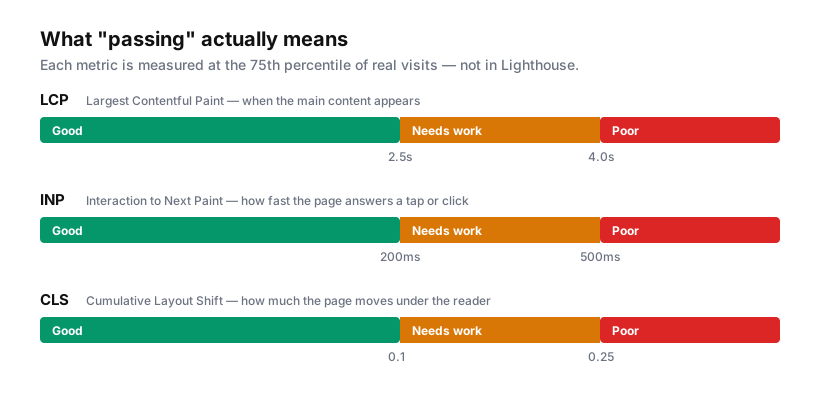
INP replaced First Input Delay as a Core Web Vital in March 2024. If you're working from a guide that still talks about FID, it predates the change and its advice on interactivity is probably stale — FID only measured the delay before processing started, which made it easy to pass while still feeling sluggish. INP measures the whole interaction through to the next paint, which is much closer to what a person notices.
What actually makes Webflow sites slow
Webflow does a lot right by default. Sites are served from a global CDN, assets are cached, HTML is minified, and images uploaded through the Assets panel or a CMS image field get srcset and sizes automatically, with WebP served to browsers that support it. You don't have to build any of that.
So when a Webflow site is slow, it's rarely Webflow's hosting. In practice it's one of four things, roughly in order of how often they're the culprit:
1. Hero media that's far too large. A 4000px-wide background image or an uncompressed hero video is the single most common cause of a bad LCP. Webflow will serve responsive variants of the image, but the variants are generated from what you uploaded — a 6MB PNG produces large variants.
2. Third-party scripts nobody audits. Chat widgets, heatmaps, review embeds, A/B testing tools, three analytics platforms because marketing changed vendors twice and nobody removed the old snippets. Each one is a request, a parse, and main-thread work. This is usually what wrecks INP.
3. Lottie animations above the fold. A Lottie file is JSON, and JSON can be big. The player library adds roughly 60KB before the animation itself. Beautiful in the Designer, expensive at first paint.
4. jQuery, when nothing uses it. Webflow includes jQuery to power its interactions. If your site doesn't use Webflow interactions or custom jQuery, it's dead weight.
Notice what isn't on that list: your CSS class count. Unused classes bloat the stylesheet a little, and cleaning them up is good hygiene, but it is nowhere near the top of the list. Teams spend days on a "clean up unused styles" sprint and see nothing move, because they optimised a 40KB file while a 3MB hero image sat untouched.
Fixing LCP: find the element first
LCP measures when the largest content element in the viewport finishes rendering. Before optimising anything, identify which element it is — PageSpeed Insights names it, and Chrome DevTools shows it in the Performance panel under Timings.
It's almost always your hero image, hero video, or the headline text if there's no image.
Once you know the element:
If it's an image, resize the source before upload. A full-bleed hero rarely needs more than 2400px wide; a card thumbnail needs a few hundred. Compress it — WebP at quality 80 is usually indistinguishable from PNG at a fraction of the size. Then make sure it isn't lazy-loaded. Webflow lets you set image loading behaviour per element, and lazy-loading your LCP image is actively harmful: the browser deprioritises the one asset the metric is waiting for. Set the hero to eager, lazy-load everything below the fold.
If it's a video, don't autoplay it above the fold on mobile. Use a poster image as the LCP element and load the video after, or swap to a static image at mobile breakpoints entirely. Background video is the most reliable way to fail LCP on a phone.
If it's text, you have a font problem. Custom fonts block text rendering until they load. Use font-display: swap so text paints in a fallback immediately, and preload the one or two weights that appear above the fold. And genuinely audit weights — a site loading Regular, Medium, Semibold, Bold and their italics is downloading eight files to render a headline and a paragraph.
Fixing INP: the main thread is the whole story
INP is about responsiveness. When someone taps, how long until the screen updates? If the main thread is busy executing JavaScript, the tap waits.
This is where third-party scripts do their damage, and where the fix is almost always about when rather than whether.
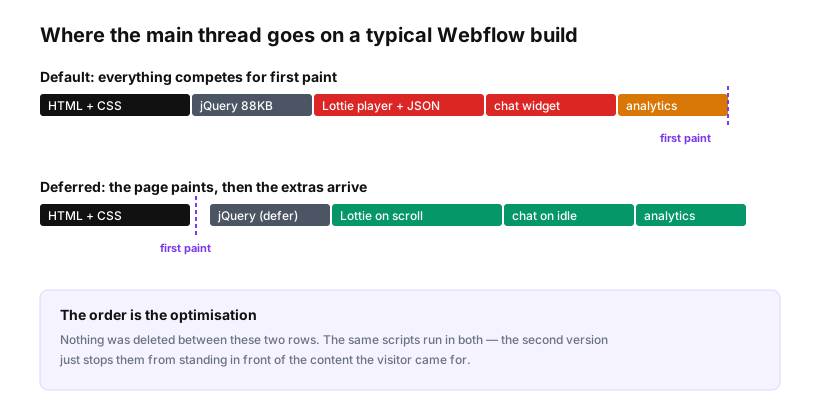
Nothing was removed between those two rows. The same scripts run in both. The second version just stops them from competing with the content the visitor came for.
Concretely, in Webflow:
Defer what you can. Any custom script in Site Settings → Custom Code that isn't needed for first render should carry defer:
<script src="https://example.com/widget.js" defer></script>
Load heavy widgets on interaction or idle. A chat widget doesn't need to exist until someone might use it. This pattern costs nothing and routinely removes a large chunk of main-thread work:
<script>
  // Load the chat widget when the browser is idle, or after 5s
  // on browsers without requestIdleCallback.
  function loadChat() {
    if (window.__chatLoaded) return;
    window.__chatLoaded = true;
    var s = document.createElement('script');
    s.src = 'https://example.com/chat.js';
    s.async = true;
    document.body.appendChild(s);
  }

  if ('requestIdleCallback' in window) {
    requestIdleCallback(loadChat, { timeout: 5000 });
  } else {
    setTimeout(loadChat, 5000);
  }
</script>
Lazy-load embeds that sit below the fold. Maps, video players and review widgets are ideal candidates — use an IntersectionObserver to load them as they approach the viewport.
Remove jQuery if you're not using it. Project Settings → Custom Code → Advanced. Test thoroughly afterwards: Webflow interactions, sliders, tabs and dropdowns lean on it, and custom code you inherited may too.
Then audit the tag manager. If everything routes through GTM, the container is the real payload, and it grows quietly. Open it, list every tag, and ask what each one is for. Most sites carry at least one tag whose owner left the company.
Here's the decision I'd apply to anything before it goes in:
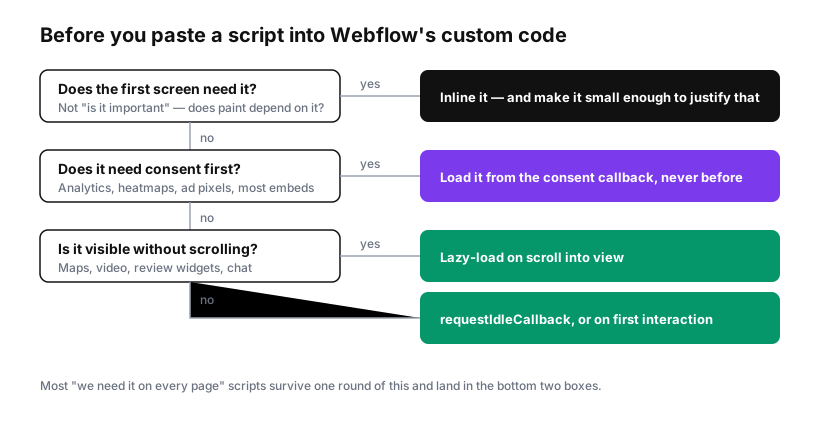
There's a compliance dimension here too. If a script sets cookies or processes personal data, in most European jurisdictions it shouldn't run until the visitor consents — which conveniently means it can't block your first paint either. Getting consent right and getting performance right pull in the same direction more often than people expect.
Fixing CLS: reserve the space
Cumulative Layout Shift measures content moving while someone is reading. It's the least discussed and, on Webflow, usually the easiest to fix.
The main causes:
Images without dimensions. If the browser doesn't know an image's aspect ratio, it allocates zero height, then reflows everything below when the image arrives. Webflow adds width and height to images placed through the Designer; images injected via custom code or embeds often lack them. Set explicit dimensions or an aspect-ratio in CSS.
Web fonts swapping. A fallback font renders, then the custom font loads with different metrics, and text reflows. font-display: swap plus a fallback with similar metrics reduces the jump. size-adjust on the @font-face can nearly eliminate it.
Injected banners. Cookie banners, promo bars and announcement strips that appear a moment after load and push everything down. Either reserve the space, or overlay them rather than inserting them into the flow. A consent banner that shifts the page on every first visit is a CLS problem on your highest-traffic moment.
Embeds that resize themselves. Third-party iframes that load, measure, and adjust. Give the container a fixed height where you can.
A realistic order of work
If you have one afternoon:
- Find your LCP element in PageSpeed Insights. Fix that one asset — resize, compress, stop lazy-loading it.
- List every third-party script. Delete the dead ones. Defer or lazy-load the rest.
- Check whether jQuery is doing anything. Remove it if not.
- Fix layout shift on anything that injects itself after load — usually the cookie banner.
- Audit font weights and drop the ones you don't use.
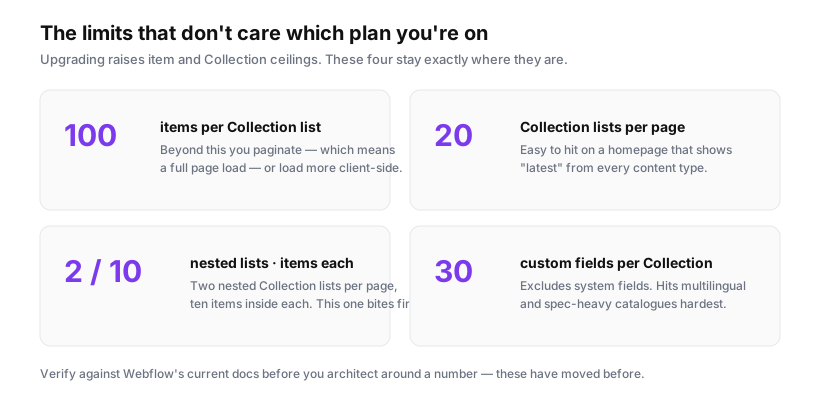
That sequence handles the large majority of what's wrong with a typical Webflow marketing site. What it won't do is fix a site that's slow because of genuine architectural decisions — a homepage rendering six Collection lists, or a page that loads a 200-item catalogue client-side. Those need design changes, not toggles.
Two things worth setting expectations on
Field data lags. CrUX aggregates 28 days. Fix something today and Search Console will keep showing the old number for weeks while the window rolls forward. Don't conclude the fix failed after four days — verify with lab tools that the change landed, then wait for the field data to catch up.
Not every page needs to pass. Core Web Vitals is one signal among many, and relevance beats speed on most queries. A fast page that answers nothing still loses to a slow page that answers the question. Fix the pages that matter — the ones with traffic and commercial intent — before you optimise a privacy policy nobody reads.
The honest summary is that Webflow gives you a good performance baseline and then hands you enough rope to undo it. Almost every slow Webflow site got that way by accumulation: one more script, one more animation, one more hero video, each individually defensible. The fix is usually subtraction, and it's usually faster than the rebuild people assume they need.
Sources: web.dev Core Web Vitals · Chrome UX Report · Webflow responsive images