On this page
The constraint everything else follows from
Webflow publishes a site, not a change. Press Publish and everything currently in the Designer goes live — including the half-finished section a colleague was working on this morning.
There is no per-page publish, no feature branches, no merge. That single fact shapes every workflow below. Teams that fight it lose; teams that design around it do fine.
Two ways this bites:
Concurrent work. Two people building different pages. One publishes a copy fix; the other's unfinished page ships too.
No rollback of a single change. Webflow keeps backups you can restore, but restoring reverts the whole site to that point — including everything else that happened since.
Staging: what the .webflow.io domain is for
Every site has a yoursite.webflow.io staging URL. It's the primary review surface: publish there, review, then publish to production when approved.
Two rules:
Disable subdomain indexing. Site Settings → SEO. Otherwise you've published a complete duplicate of your site competing with the real one in search.
Publish to staging only, deliberately. The publish dialog lets you choose domains. Selecting only the staging domain is what makes review possible. Getting this wrong is the most common accident in Webflow teams — the muscle memory is to hit Publish and confirm.
For higher-stakes work, a duplicate project as a true sandbox is better: entirely separate, no risk of accidental publish, and someone can rebuild a section freely. The cost is that changes must be reproduced in the real project afterwards, so keep it for exploration rather than production work.
Coordinating who's building what
Since you can't branch, coordination is social. What works:
A publish owner. One person publishes. Everyone else requests. Sounds bureaucratic; prevents the most expensive accidents.
A shared "in progress" note. A pinned Slack message or a Notion line listing who's touching which pages. Ten seconds to update, prevents two people editing one template.
Publish windows. Publishing happens at agreed times — end of day, or twice weekly — rather than continuously. Work in progress accumulates safely between them.
Draft-first for CMS content. Content in Draft doesn't appear when the site publishes. So editors can work continuously regardless of what's happening in the Designer, and content goes live by flipping Draft off rather than by publishing the site. This is the single most useful pattern here, and it's underused.
Content workflow, separately from design
Once you separate these, most friction disappears.
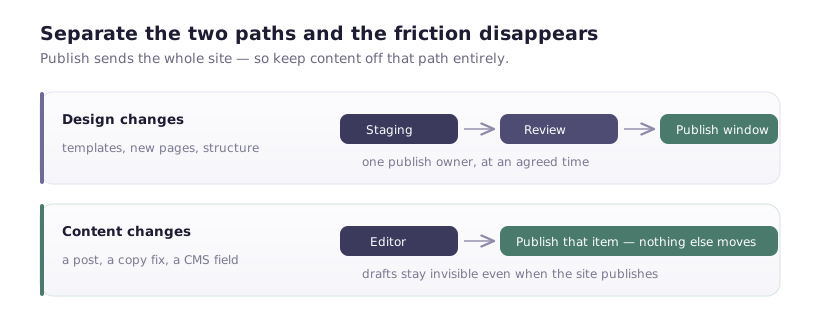
Design changes — structural, templates, new pages. Go through staging review and a publish window.
Content changes — a new blog post, updated copy in a CMS field. Edited in the Editor, published per item.
The Editor is genuinely good at this: an editor changes text on a live page, sees it in place, publishes just that. No Designer access, no risk to layout.
If your marketing team is asking a designer to change copy, you've mis-scoped who gets Editor access. Give them the Editor, keep them out of the Designer, and most coordination problems evaporate.
Reviewing effectively
Review on staging, on real devices. Not in Designer preview, which lies about scroll behaviour, fixed positioning and interaction timing.
Comments in Webflow where they attach to the element in question, rather than a Slack thread describing "the bit under the hero".
A checklist for structural changes, because the same four things break:
- Every breakpoint, including the one nobody uses
- Forms actually submitting, on staging
- Links going where they claim
- Metadata on new pages — title, description, canonical
That last one is the most-skipped step in Webflow teams and directly causes the "twelve pages with the same title" problem.
Backups, and what they can't do
Webflow creates automatic backups and lets you create named ones. Before any significant change — a template restructure, a class cleanup, a bulk CMS operation — create a named backup with a description. "Before nav restructure, 12 March" is worth something in three weeks; "Backup 47" is not.
The limitation to understand: restoring reverts the whole site. If your nav change was Tuesday and someone published three blog posts Wednesday, restoring to Monday loses the posts. Backups are a disaster recovery tool, not an undo.
Practical consequence: after a risky change, verify quickly. The longer you wait, the more collateral a restore costs.
CMS operations, where the real risk is
Bulk operations have no undo. A CSV import that maps a field wrongly across 800 items is not reversible by restoring a backup, because backups don't cover CMS content the way they cover design.
So:
Export before you import. A CSV of the current state is your only realistic recovery path.
Test on five items. Always. Check references resolved, images came across, rich text rendered.
Do bulk work when nobody else is publishing, so a mistake doesn't compound.
A workflow for a team of five
Concretely, what I'd run:
- Editors have Editor access only. They write, publish per item, never touch the Designer.
- Designers work in the Designer, publish to staging freely.
- One publish owner pushes to production, at agreed windows.
- Named backup before structural work, with a real description.
- A pinned message listing in-progress pages.
- Staging indexing disabled, checked quarterly because someone will re-enable it.
That's it. No tooling to buy, and it removes most of what makes Webflow feel fragile with more than two people.
When you've outgrown it
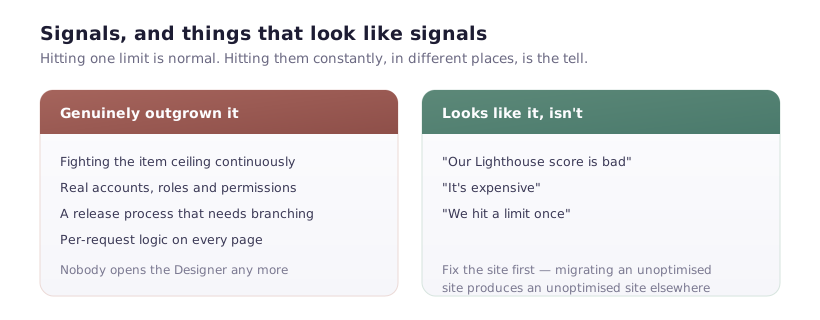
If you're running a genuine release process — multiple parallel features, staged rollouts, per-change rollback — Webflow's publishing model will keep hurting, and process won't fix a platform constraint.
That's not a failure of Webflow. It's built so a marketer can ship a page without a deploy, and that requires publishing to be simple. If you need branching and atomic releases, you need a different tool for the part that needs them — usually while keeping Webflow for the marketing site, where its actual strength is.