On this page
Why Webflow projects rot
Every Webflow project starts clean. Six months later the Style panel holds heading, heading-2, heading-2-copy, hero-heading, Heading Large, and nobody can say which is safe to change.
The mechanism is specific to how Webflow works: styling an element creates a class, duplicating an element duplicates its class, and editing a class changes every element using it — instantly, everywhere. So editing feels risky, and the safe-feeling move is always to make a new class. That instinct, repeated across a team, is what produces four hundred near-duplicates.
A naming convention doesn't fix that by itself. What fixes it is a convention that makes the right class findable, so making a new one stops being the path of least resistance.
The convention
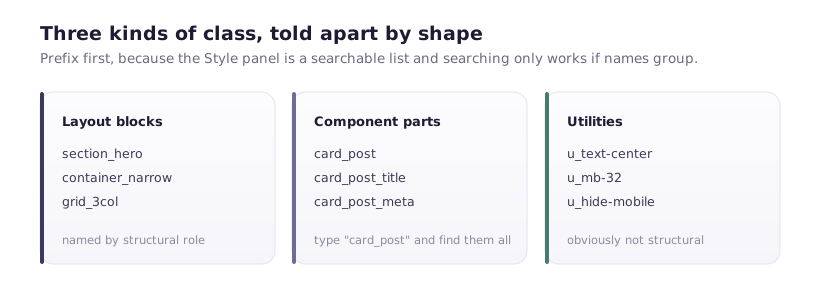
Three kinds of class, distinguished by shape.
Layout blocks — section_hero, container_narrow, grid_3col. Named by structural role.
Components — card_post, card_post_title, card_post_meta. Component name first, then the part. Every part of a component shares a prefix, so typing card_post in the Style panel filters to exactly that component's classes.
Utilities — u_text-center, u_mb-32, u_hide-mobile. Single-purpose, combo classes, u_ prefix so they sort together and are obviously not structural.
The prefix-first ordering is the whole point. Webflow's Style panel is a searchable list, and a searchable list is only useful when related things share a beginning. post_card_title and title_post_card contain the same words; only one groups usefully.
Never name by appearance. text_blue, button_big, heading_32px are true on the day they're written and lies within a quarter. Name by role: button_primary, heading_section.
Combo classes: use sparingly, deliberately
Webflow's combo classes let you add a modifier on top of a base — button plus is-secondary. They're powerful and the most common source of confusion, because a combo inherits from its base, and changing the base changes every combo.
Rules that hold up:
One level. button + is-secondary. Not button + is-secondary + is-large + is-icon. Multi-level combos become impossible to reason about.
is- prefix for modifiers. Instantly readable as a variant.
Modifiers change one thing. is-secondary changes colour. If it also changes padding, size and radius, it isn't a modifier — it's a different component.
Set the global styles once, properly
Most class sprawl comes from restyling things that should have been set globally.
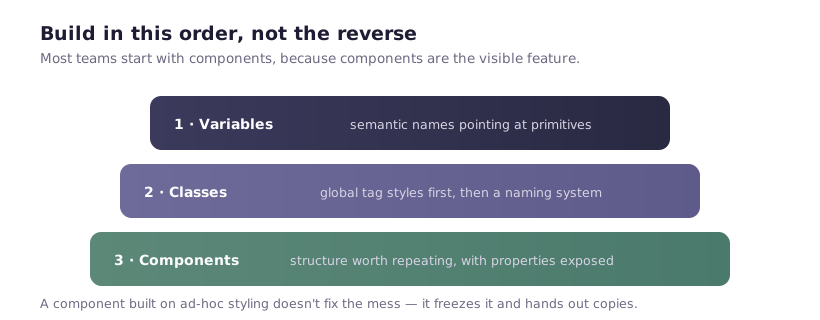
In the Designer, style the base tags first — All H1, All H2, All Paragraph, All Links — in the "Selectors" dropdown. Then most text needs no class at all. A page where every paragraph carries text-body-regular is a page where someone didn't set the paragraph tag.
The same applies to the body: font family, base size, line height and colour set once on the body tag cascade everywhere.
This single practice removes more classes than any naming convention.
Rules a team can actually follow
Five, short enough to remember:
- Search before you create. Type what you want in the Style panel. If something close exists, use it.
- Never duplicate-and-rename to get a variant. Use a combo class.
- Name by role, never appearance.
- Component parts share the component prefix.
- If you're about to make the fifth variant of something, stop. Five variants means the component is wrong, or you're solving a design inconsistency in CSS.
Rule 1 is the one that matters and the one that gets skipped under deadline. It's also the reason the prefix convention exists — searching only works if names group.
Cleaning up a project that already rotted
Don't start with a rename. Start by finding out what's actually unused.
1. Find unused classes. Webflow's Style panel shows a count of elements per class. Zero means nothing uses it. Webflow's own cleanup tool removes these in bulk — run it, but read the list first: a class used only inside a Symbol or a Collection page template can occasionally be miscounted, so scan for anything you recognise as structural before confirming.
2. Find near-duplicates. Sort alphabetically and read. heading-2 next to heading-2-copy next to heading-large is a cluster to consolidate.
3. Consolidate one cluster at a time. Pick the best-named class, apply it to elements using the others, delete the leftovers. Then publish and check. Doing five clusters at once and finding the homepage broken teaches you nothing about which change caused it.
4. Set global tag styles if they aren't set, then remove the classes that were only recreating them.
5. Then rename, if it's still worth it. Renaming is safe in Webflow — it updates every element — but it's cosmetic. Deleting 200 unused classes helps more than renaming 200 used ones.
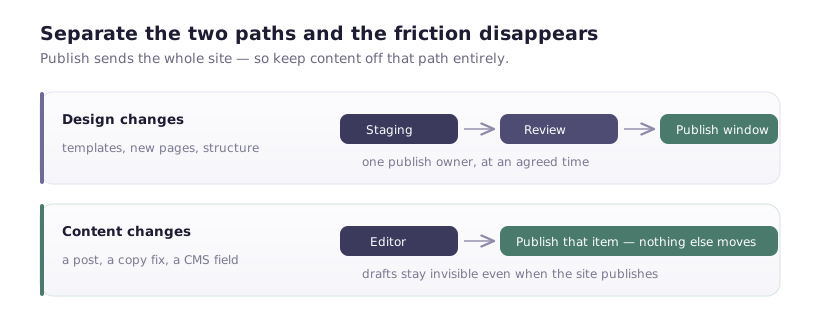
Do this on a staging copy first if the site is live and busy. Duplicate the project, clean it, verify, then apply the learning to the real one — or promote the copy if your workflow allows.
What good looks like
A project where a new designer can:
- Find the class for a card title by typing
card - Tell components from utilities at a glance
- Change the primary button colour in one place
- Add a page without creating any new classes, because the system already covers it
That last one is the real test. If building a new page requires inventing twenty classes, the system isn't a system — it's a history of individual decisions.
The uncomfortable part
None of this survives without someone owning it. Conventions decay under deadline pressure, and the person shipping at 6pm on Friday will make hero-heading-2 and move on.
What works in practice: a short written convention in the project notes, a named owner, and a quarterly cleanup that's scheduled rather than aspirational. Half a day every three months keeps a project legible for years. Skip it for a year and you're looking at a rebuild — which is how "we should just redesign it" conversations start, when the design was never the problem.