On this page
Why we're writing this
We build Webflow apps. The commercially convenient position is that Webflow is right for everything.
It isn't, and pretending otherwise wastes people's money. Teams that stay too long spend a year building elaborate workarounds for constraints they should have designed around — and the cost of leaving grows the whole time.
So: the signals that genuinely mean you've outgrown it, the ones that look like it and don't, and what to do in each case.
Signals that genuinely mean it's time
1. You're fighting the CMS item ceiling continuously
Not "we upgraded once". Continuously — pruning old items to make room, splitting Collections to dodge limits, monitoring counts to avoid failed syncs.
Webflow's CMS is built for editorial content. If you're managing tens of thousands of frequently-changing records, you're using a publishing tool as a database, and the workarounds compound.
What to do: move the data-heavy section to something built for it, and keep Webflow for the marketing site.
2. You need real user accounts and permissions
Anything beyond simple gating — user-specific data, roles, dashboards, a place where people log in and do things — is application territory.
Memberstack and similar tools genuinely stretch this further than people expect, and there's a real ceiling. If your permission model needs a diagram, you've passed it.
What to do: build the application properly on its own subdomain. Keep the marketing site where it is.
3. Your release process needs branching
Webflow publishes the whole site at once. No branches, no per-change rollback, no staged releases.
For a marketing site with a handful of editors, that's fine and the coordination cost is small. For a team running parallel features with a genuine release process, it's a permanent tax, and no amount of process fixes a platform constraint.
What to do: if the marketing site itself needs this, you need a different stack for it. That's rarer than people think — check whether it's actually the product that needs it.
4. Content lives somewhere else and syncing hurts
You've built a sync from Airtable, a PIM or an ERP, and it's a maintenance burden: rate limits, stale data, failures nobody notices, deletions that don't propagate.
What to do: consider a headless CMS with your data as the source of truth, or invest properly in the sync with monitoring and ownership. The failure state is the middle — a sync nobody owns.
5. Per-request logic is now unavoidable
Personalisation by user, dynamic pricing, real-time inventory, anything needing a decision on the server per request. Webflow serves static pages from a CDN, which is why it's fast.
Client-side JavaScript can fake some of it. If your homepage is now a shell that fetches everything after load, you have the costs of a dynamic site and the benefits of neither.
What to do: the parts needing server-side logic belong on infrastructure that does it.
6. Nobody uses the Designer any more
Everything meaningful now happens in custom code. Webflow is a wrapper around an application you've built inside embeds.
At that point you're paying for a visual builder nobody uses, and accepting its constraints for no return.
What to do: ship the thing you've actually built, on infrastructure suited to it.
Signals that look like it and aren't
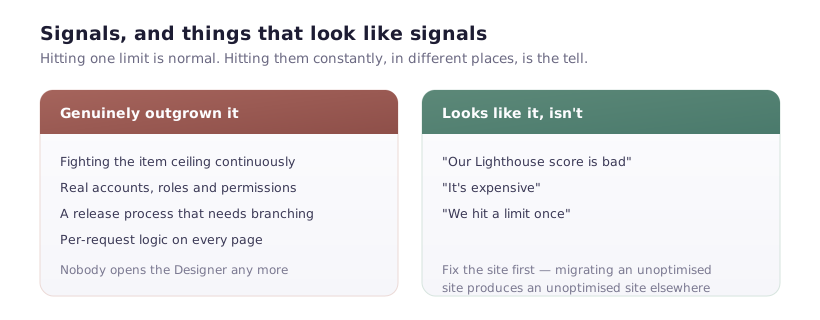
"Our Lighthouse score is bad"
Almost always the site, not the platform. Oversized hero images, a dozen third-party scripts, six font weights, background video on mobile.
Fix those first. A well-tuned Webflow site outperforms a carelessly built custom one, and migrating an unoptimised site produces an unoptimised site somewhere else.
"It's expensive"
Compare honestly. A Site plan against hosting plus CDN plus a developer's time for every content change. Webflow is expensive relative to static hosting and cheap relative to a developer being the bottleneck for a copy edit.
Where the argument does hold: a brochure site that genuinely never changes. Then static hosting is cheaper and nothing is lost.
"We hit a limit once"
A single Collection near its ceiling, one page needing an awkward workaround. That's normal on every platform.
The signal isn't hitting a limit — it's hitting them constantly, in different places, with workarounds accumulating.
The option most teams should take
Not "leave" — split.
Marketing site stays on Webflow: pages, blog, case studies, careers. Editors publish without a deploy. The design system lives where designers work.
The application runs on its own infrastructure at app.yourdomain.com: accounts, dashboards, data, per-request logic.
You keep publishing velocity where it matters and engineering control where you need it. The main cost is two systems and a shared design language across them, which is a smaller cost than either extreme.
Full migration makes sense when the marketing site itself has genuinely outgrown Webflow — which is much rarer than the product outgrowing it.
Before you decide
Write down, specifically:
- What can't you do today? Not "it's limiting" — the actual blocked thing.
- What's the workaround costing? Hours per month.
- Who maintains the alternative? If the answer is "we'd hire someone", price that.
- What do you lose? Editors publishing without developers, usually. That's worth more than teams remember once it's gone.
- What does the migration cost? Rebuilding templates, moving content, mapping redirects, rewiring forms, retraining. Three months is a realistic floor for a real site.
If the answers still point out, go — deliberately, with the redirect map planned before the rebuild starts, not discovered afterwards in Search Console.
And if they don't, the honest conclusion is that your Webflow site needs work rather than replacement. That's a less exciting answer than a migration, and it's usually the correct one.