On this page
What programmatic SEO actually is
One template, many pages, each populated from a row of structured data. /integrations/slack, /integrations/notion, /integrations/hubspot. Or /webflow-developers/london, /webflow-developers/manchester.
It works when each page answers a query someone genuinely types and gives them something specific. It fails — expensively — when the pages differ only by a swapped noun.
The failure mode isn't that the pages don't rank. It's that a few hundred near-identical pages can drag on how the whole site is assessed. You can end up worse off than before you started, and unpicking it means deleting pages and waiting for a recrawl.
The test that predicts success
Before building anything, write one page by hand. Fully. Then ask:
Could someone reasonably search for this specific thing? Not the category — this page. "Webflow Slack integration" — plausible. "Webflow integration number 47" — no.
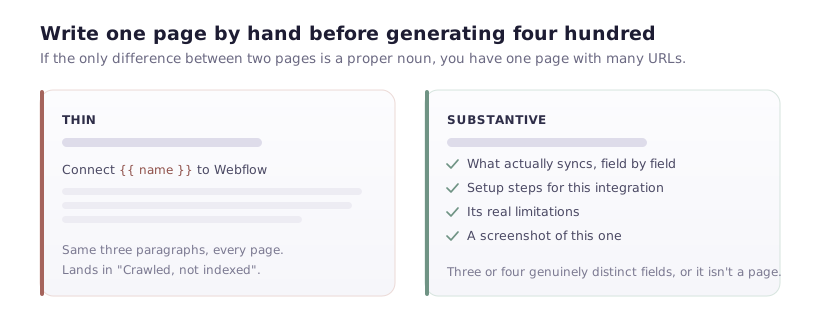
Does the page contain anything that isn't a substituted variable? If the only difference between page A and page B is a product name, you have one page with a hundred URLs.
Would you link to it from your own newsletter? If it's too thin to send to a customer, it's too thin to index.
If your hand-written page fails these, generating four hundred of them multiplies the problem rather than solving it.
What makes each page substantively different
This is the whole discipline. Each page needs unique data, not unique wording.
Genuine per-item data. Not paraphrase — facts that differ. For an integrations page: what specifically syncs, which fields map, what the setup steps are, known limitations. Those differ per integration and can't be templated.
Per-item media. A screenshot of that integration, not a generic illustration reused across all pages.
Per-item questions. Real FAQs specific to that item. Support tickets are the best source — the questions people actually ask about that thing.
Unique intro and conclusion. Two or three sentences written per item. It's tedious for a hundred pages, and it's the difference between a page that reads as written and one that reads as filled.
If you can't source three or four genuinely distinct fields per item, you don't have a programmatic SEO opportunity. You have a table that belongs on one page.
Building it in Webflow
The mechanics are straightforward — a Collection, a Collection page template, and fields bound into it.
Model the fields first. Every unique element needs a field: intro, setup_steps, limitations, faq_1_question, faq_1_answer, screenshot. Remember the 30 custom fields per Collection cap — programmatic templates hit it faster than any other use case, because each unique element is another field.
If you're running out, split: an Integrations collection and an Integration FAQs collection referencing it. That costs a Collection slot and buys you unlimited FAQs per item — though note a nested list renders only ten.
Template the page. Bind everything. Then use conditional visibility so sections hide when their field is empty — an empty "Limitations" heading with nothing under it looks broken and reads as thin.
Per-page metadata. In Collection page settings, build the title and description from fields: {{ name }} integration for Webflow | YourBrand. Never let a hundred pages share one title — that's the fastest route to a duplicate-content problem, and it's the mistake I see most often.
Set the canonical to the page's own URL.
Publish gradually
Publishing four hundred pages in one day is a pattern worth avoiding. It looks like what it is, and it means every page arrives with zero internal links and no differentiation in Google's eyes.
Publish in batches. Start with twenty, ideally the twenty with the strongest data. Wait a month. Check Search Console: are they indexed? Getting impressions? Any landing in "Crawled – currently not indexed"?
That last bucket is your quality signal. If twenty pages get indexed and earn impressions, the format works — publish more. If most land in "crawled, not indexed", Google has judged them not worth storing, and generating another three hundred of the same thing will not change its mind.
This feedback loop is the single most valuable practice in programmatic SEO, and skipping it is what turns a good idea into a cleanup project.
Internal links, or nothing gets crawled
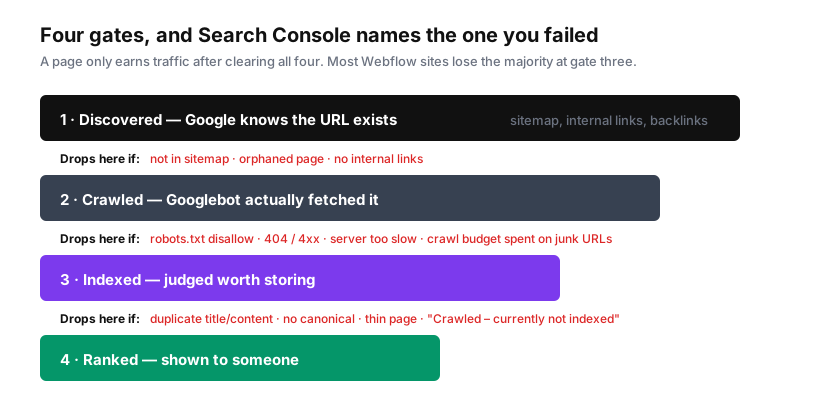
Generated pages are orphans by default — nothing links to them except the sitemap, which is a weak signal.
Minimum viable structure: an index page listing every generated page, linked from your main navigation or footer; each generated page linking back to the index and to two or three siblings; and contextual links from existing high-traffic content into the strongest generated pages.
Without this, you'll watch pages sit in "Discovered – currently not indexed" indefinitely. Google knows the URL exists and hasn't found a reason to prioritise crawling it.
When it's the wrong approach
Your data is thin. Three fields per item isn't a page.
The queries don't exist. Check search volume before building. Generating city pages for a service nobody searches locally produces four hundred pages nobody wants.
You can't maintain it. Generated pages go stale. If nothing updates the source data, you'll have four hundred pages of wrong information in eighteen months.
You're doing it because it's cheap. The cost isn't in generating pages — it's in sourcing genuinely distinct data for each. If that research isn't happening, the cheapness is the problem.
An honest benchmark
If you can produce twenty pages that each contain something a competitor's page doesn't, you have a programmatic SEO project.
If you can produce four hundred pages that each contain a substituted product name, you have a liability that will take longer to remove than it took to build.