On this page
Why internal links earn their reputation
Internal links do three concrete things: they distribute authority from pages that have it to pages that need it, they tell Google what a page is about via anchor text, and they give visitors somewhere to go next.
The third is the one that matters commercially and the one people optimise last.
The problem is that manual linking doesn't scale. At twenty posts you can hold the whole site in your head. At sixty you can't, and new posts get linked from nothing — which is exactly the "Discovered – currently not indexed" pattern, because a page nothing links to looks unimportant.
Three mechanisms, in order of value
1. Contextual links in body content
Links inside a paragraph, in a sentence that would exist anyway. These carry the most weight and are the most useful to a reader.
They're also the only kind you can't fully automate, because the sentence has to make sense. What you can automate is knowing where to add them.
Find posts with no incoming links:
// Run on a category or archive page listing all posts.
// Collect every post URL, then check which are linked from body content.
const all = [...document.querySelectorAll('a[href*="/blogs/"]')]
  .map(a => new URL(a.href).pathname);

console.log('unique posts listed:', new Set(all).size);
Better: crawl the site with Screaming Frog's free tier and sort by "Inlinks". Anything with 1 — the archive listing — has no contextual links at all. That's your work queue, ordered by which pages you most want ranking.
Then, for each, find three existing posts that genuinely relate and add a sentence linking to it. Three good links from relevant pages beat thirty from a sidebar.
2. Related posts from a CMS reference
The scalable version, and where Webflow's content model does real work.
Add a multi-reference field on your Posts collection pointing at Posts — call it "Related articles". Editors pick two or three when publishing. Render them at the foot of the article with a Collection list.
Why editorial selection beats automation here: a tag-based "related posts" widget reliably surfaces the least relevant post that happens to share a generic tag. A human picking three takes ten seconds and produces genuinely related links, which is better for readers and for the signal it sends.
Remember the ceiling: that nested Collection list renders ten items. Fine for related posts; don't build a hub page on it.
3. Topic hubs
A page per topic that links to every article on it, and every article links back.
In Webflow this is a Collection page for your Categories collection, listing posts via a filtered Collection list. Each post links up to its category, the category links down to every post.
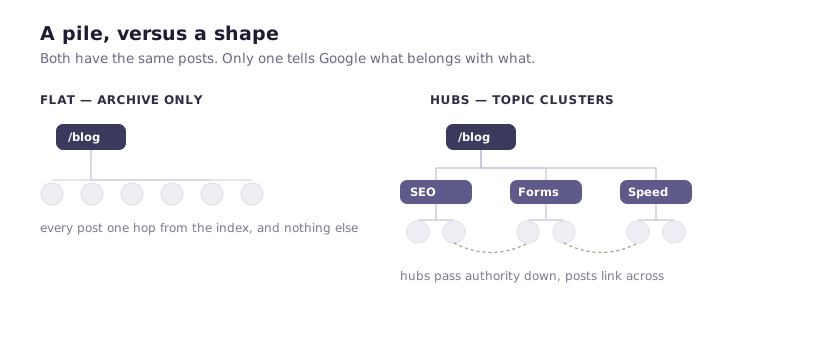
This is structurally the most valuable thing on the list, because it creates a coherent shape rather than a flat pile: hub pages accumulate authority from their members and pass it back to the ones that need it, and Google gets an unambiguous statement about which pages belong to which topic.
If your categories only exist as a filter state on /blog, you don't have hubs — you have one page with query parameters. Build real category pages.
Anchor text, briefly
The words in the link tell Google what the destination is about. So:
Descriptive, not "click here" or "read more". nested Collection list limits beats this article.
Varied. Fifty links with identical anchor text reads as manipulation. Vary naturally — that happens automatically if you write the sentence first and link within it.
Honest. Anchor text that doesn't match the destination is a bad experience and gets discounted anyway.
The pattern to avoid
Adding every post to a sidebar or footer list on every page.
It looks like internal linking and behaves nothing like it. Site-wide boilerplate links are discounted heavily — Google is good at recognising navigation from content — and worse, a hundred links in the footer dilutes every link on the page, including the ones you care about.
Same principle applies to the "you might also like" widget showing twelve random posts. Three relevant links are worth more than twelve arbitrary ones.
A workable process
For a site publishing weekly, this is about fifteen minutes per post:
When publishing:
- Pick 2–3 related articles for the reference field.
- Find 2–3 existing posts that should link to this one, and add a contextual sentence in each.
- Confirm the category is set, so it joins its hub.
Step 2 is the one that gets skipped, and it's the one that matters — a new post starts with zero authority, and links from established pages are how it gets any.
Quarterly:
- Crawl the site, sort by inlinks, find orphans.
- Check your top-traffic pages link to your top-commercial pages.
- Check for broken internal links — deleted posts leave dead links behind, and Webflow won't warn you.
The one check worth doing today
List your five highest-traffic pages. List your five most commercially important pages. Do the first group link to the second?
On most sites they don't. The blog posts pulling traffic link to other blog posts, and the pricing page is reachable only from the nav.
Adding a contextual link from your best-performing article to the page that makes money is fifteen minutes of work and the highest-yield internal linking change available to most sites. It's also the one nobody does, because it isn't a project.