On this page
What duplicate content does and doesn't do
Clearing this up first, because the topic attracts more myth than most.
There is no "duplicate content penalty". Google doesn't punish you for having similar pages. What happens is more mundane and still costly: Google picks one version to index and ignores the rest, and it may not pick the one you wanted. Authority that should concentrate on one URL spreads across several. In Search Console this shows up as "Duplicate without user-selected canonical" or "Duplicate, Google chose different canonical than user".
So the cost is dilution and loss of control, not punishment. Worth fixing, not worth panicking about.
1. The staging subdomain
The most consequential one, and it's on by default.
Every Webflow site has a .webflow.io staging URL serving a complete copy of your site. If it's indexable, you have published every page twice on two domains.
Fix: Site Settings → SEO → disable subdomain indexing. This requires a paid Site plan or Workspace.
Check it: search site:yoursite.webflow.io. Any results mean it's indexed. Disabling indexing stops future crawling, but pages already indexed may linger — you may need to request removal in Search Console for the worst cases.
2. Two pages doing one job
The most common one on established sites, and it's created by people rather than the platform.
/contact and /contact-us. /pricing and /plans. /about and /about-us. Usually a page was rebuilt, the new one launched, and nobody deleted the old.
Both get indexed. Both are near-identical. They compete, and whatever authority the topic earned is split between them.
Fix: decide which URL wins, 301 the other to it, and update internal links. Pick the winner by where your internal links already point — that's where authority is flowing.
Check it: crawl your own site and sort by page title. Duplicate or near-duplicate titles are where to look.
3. Filtered and paginated collection views
/blog?category=seo, /blog?page=3, /products?sort=price.
These are the same page with different query parameters. They're not usually a crisis — Google handles parameters reasonably well — but they can consume crawl budget on large sites and occasionally get indexed in place of the canonical version.
Fix: self-referencing canonical on the base page, so /blog?category=seo canonicals to /blog. In Webflow, the global canonical setting handles most of this.
Exception worth understanding: if a filtered view genuinely is a distinct, valuable page — a real category archive with its own metadata and intro copy — then it shouldn't be a query parameter at all. Build it as a proper page at /blog/category/seo with its own self-referencing canonical. A page worth ranking deserves a URL, not a filter state.
Pagination is different. /blog?page=2 should generally not canonical to page 1, because doing so tells Google the items on page 2 don't exist anywhere. Let paginated pages self-canonicalise.
4. Trailing slashes and protocol variants
https://example.com/pricing and https://example.com/pricing/ are, technically, different URLs. Same for www and non-www, http and https.
Webflow handles most of this with automatic redirects, but it's worth verifying rather than assuming, especially after a domain change:
for u in "http://example.com/pricing" "https://example.com/pricing/" "https://www.example.com/pricing"; do
  echo -n "$u -> "
  curl -s -o /dev/null -w "%{http_code} %{redirect_url}\n" "$u"
done
All should end at one canonical form in a single hop. Chains — http → https → www → final — waste crawl budget and leak a little authority per hop.
A Webflow-specific trap: if your default domain uses www, your global canonical tag must include the www prefix. A mismatch here creates precisely the duplication the tag exists to prevent, and it's easy to miss because the site works perfectly for humans.
5. Programmatic pages that are near-copies
Covered more fully elsewhere, but it belongs on this list: generated pages differing only by a substituted noun are functionally duplicates.
These are the hardest to fix because the answer usually isn't a canonical — it's either adding genuinely distinct content to each page, or consolidating the set into one page with a table.
Check it: take three generated pages and diff them. If the only differences are proper nouns, you have a duplication problem regardless of how many URLs it spans.
6. Localisation done as copies
If you serve the same language to multiple regions — /en-gb/ and /en-us/ with near-identical copy — you have duplicates unless you tell Google they're regional variants.
Fix: hreflang annotations linking the variants and declaring which is for which locale. Without them, Google picks one and the other may not appear in its target market.
If the pages genuinely are identical, ask whether you need both.
A 20-minute audit
site:yoursite.webflow.io— staging indexed?site:yoursite.com— skim the titles. Duplicates?- Crawl the site, sort by title, look for near-matches.
- Check the redirect chain for
http,wwwand trailing-slash variants. - View source on three pages. Confirm each has one self-referencing canonical.
- Search Console → Pages → look for the two "Duplicate" buckets. Google is telling you directly.
Step 6 is the shortcut. Google reports which pages it considers duplicates and which URL it chose instead — start there and work backwards to the cause.
What I'd fix and what I'd leave
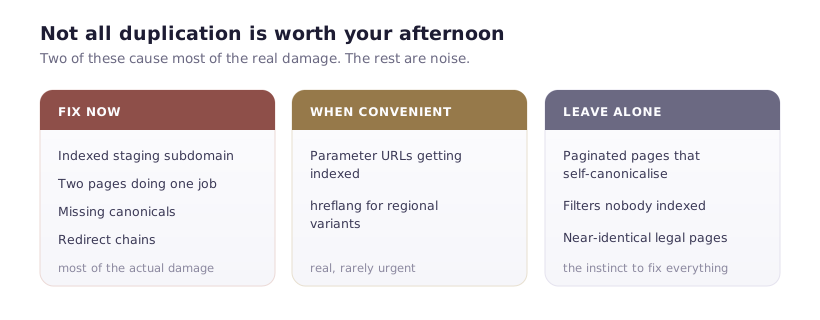
Fix immediately: indexed staging subdomain, two pages doing one job, missing canonicals, redirect chains.
Fix when convenient: parameter URLs getting indexed, hreflang for regional variants.
Leave alone: paginated pages with self-canonicals, filter parameters that aren't being indexed, near-identical legal pages nobody searches for.
The instinct with duplicate content is to fix everything. Most of it doesn't matter. The staging subdomain and the two-pages-one-job problem account for most of the real damage on the sites I look at.