On this page
The three structures
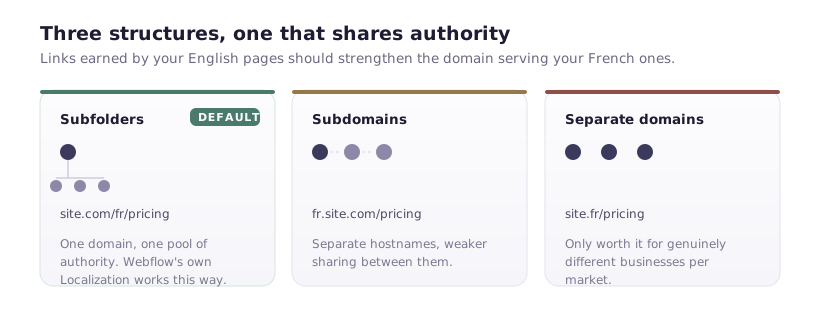
Subfolders — example.com/fr/pricing. All languages on one domain.
Subdomains — fr.example.com/pricing. Separate hostname per language.
Separate domains — example.fr/pricing. A distinct domain per market.
Webflow's native Localization feature implements the subfolder model, with translation managed inside the Designer and locale-specific content, SEO settings and assets.
For most sites, subfolders are the right answer, and the reasoning is straightforward: authority accumulates on one domain. Links earned by your English content strengthen the domain that also serves your French content. Split across subdomains or separate domains, that sharing is weaker.
Separate domains earn their cost in one situation — when you need genuinely different businesses per market, with different legal entities, product ranges or brands. That's a business decision that happens to have an SEO consequence, not the other way round.
Translation is not localisation
The distinction that decides whether this succeeds.
Translation converts words. Localisation adapts the offer: currency, payment methods, legal requirements, examples, case studies, the actual arguments that persuade someone in that market.
A machine-translated page that mentions dollar pricing, US-specific regulations and American case studies won't convert French visitors regardless of how good the French is. It may also struggle to rank, because it won't match how French searchers phrase what they want.
Which produces the strategic question worth asking first: do you have enough to say in that market to justify a version? Two well-localised languages beat six machine-translated ones — for conversion, for rankings, and for the maintenance burden you're signing up to.
hreflang: the part that decides whether it works
Structure gets your pages online. hreflang tells Google which version to show whom.
Every page needs annotations listing all its language variants, including itself:
<link rel="alternate" hreflang="en" href="https://example.com/pricing" />
<link rel="alternate" hreflang="fr" href="https://example.com/fr/pricing" />
<link rel="alternate" hreflang="de" href="https://example.com/de/pricing" />
<link rel="alternate" hreflang="x-default" href="https://example.com/pricing" />
Four rules that account for nearly every implementation failure:
Self-reference. Each page lists itself among the alternates. Omit it and the set is invalid.
Bidirectional. If the English page points to the French, the French must point back. One-directional annotations are ignored — silently.
x-default names the fallback for locales you don't target. Usually your primary language.
Absolute URLs, with the correct protocol and www state.
Webflow's Localization feature generates these for you, which removes the most error-prone part. If you're hand-rolling a multilingual site with duplicated pages, you're maintaining these by hand across every page — and it will drift.
Language codes: fr targets French speakers anywhere; fr-ca targets French speakers in Canada specifically. Use the plain language code unless you genuinely have market-specific content. fr-fr and fr-ca with identical copy is two versions competing over nothing.
Costs to price in before committing
Every page multiplies. Fifty pages in three languages is 150 pages to maintain. Every content change becomes three changes, or a translation queue.
CMS content multiplies too, and it counts against your item ceiling. A 500-item Collection in three locales is 1,500 items against your plan limit. This catches people out — check the arithmetic against your plan before building, not after.
Localised URLs are a decision. /fr/pricing or /fr/tarifs? Translated slugs are better for local search and mean any future restructure needs redirects per locale. Pick once, early.
Translation is ongoing. The initial pass is the small part. Keeping three languages in sync as the product changes is the real commitment, and it's the one that decays first.
Common failures
Auto-redirecting by IP. Sending a visitor to /fr/ because their IP looks French. It breaks crawling — Googlebot crawls largely from US IPs and will never see your other versions — and it infuriates the English-speaking expat in Paris. Offer a suggestion banner instead, and let people choose.
Missing self-referencing hreflang. Silent and total: the whole annotation set is discarded.
Translating with JavaScript. Client-side translation widgets that swap text after load. Google indexes one version; you have no separate URLs, so nothing else can rank.
Untranslated metadata. Titles and descriptions still in English on French pages. They're what searchers see in results, and English titles on a French SERP get skipped.
No local content signals. No local address, no local phone number, no local case studies. Ranking in a market usually needs some evidence you exist in it.
A sequence that works
- Pick one market and prove the demand. Localise fully, measure for two quarters.
- Localise, don't just translate — currency, examples, legal, proof.
- Use subfolders, ideally via Webflow Localization so hreflang is handled.
- Translate metadata, not just body copy.
- Verify in Search Console → International Targeting for hreflang errors.
- Then expand to a second market, having learned what maintaining one actually costs.
The mistake is launching six locales at once because the feature makes it easy. What follows is six half-maintained versions, none of which ranks, and a maintenance burden nobody has time for. One market done properly is worth more than five done partially — and you can always add the sixth once the first is paying for itself.