On this page
Ranking is the last problem, not the first
Most Webflow SEO guides open with keywords. That's the wrong end of the pipe. A page has to be discovered, crawled, and then judged worth indexing before ranking is even a question, and the majority of pages that underperform on Webflow sites are stuck at one of those earlier gates.
The useful thing about Search Console is that it tells you exactly which gate you failed. "Discovered – currently not indexed" is a different problem from "Crawled – currently not indexed", which is a different problem again from a 404. Same symptom — no traffic — three unrelated causes.
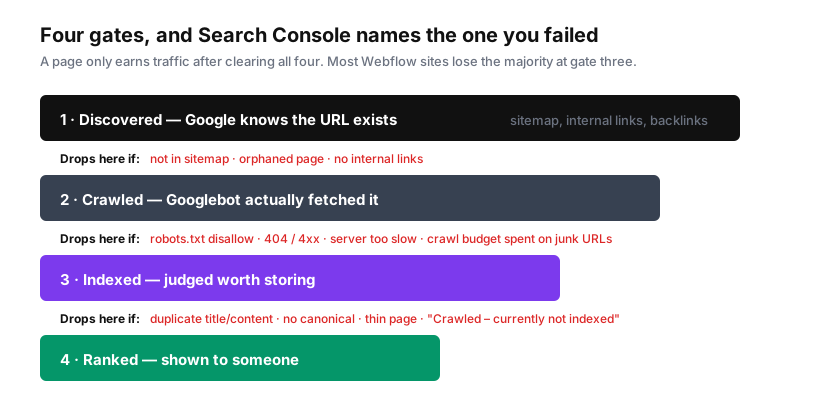
If you read one thing here, make it this: "Crawled – currently not indexed" means Google fetched your page, looked at it, and decided not to keep it. That's not a technical error you can toggle away. It's a quality judgment, and the usual causes are duplicate metadata, near-identical content across pages, or a page too thin to justify a slot in the index.
The settings that keep sites out of the index entirely
Start here, because these are binary and catastrophic when wrong.
Staging subdomain indexing. Every Webflow site has a .webflow.io staging URL. If it's indexable, you've published a complete duplicate of your site on a different domain, competing with itself. In Site Settings → SEO, disable subdomain indexing. This requires a paid Site plan or Workspace — on a free plan the staging site is public and indexable, which is one of several reasons not to run anything real on one.
Per-page indexing toggles. Each page has a sitemap indexing toggle in its settings. Turn it off for anything that shouldn't be in search — thank-you pages, gated content, template pages you built and forgot. But note the important subtlety below.
robots.txt. Webflow generates one and lets you edit it in Site Settings → SEO. It's easy to over-disallow here, and worth understanding what a disallow actually does.
Here's the trap that catches experienced people: Disallow in robots.txt does not remove a page from Google's index. It stops Googlebot from crawling the page. If Google already knows the URL from links elsewhere, it can keep it in the index — showing a bare URL with no description, because it's forbidden from reading the page. Worse, if you disallow a page you also want to noindex, Google can never crawl it to see the noindex tag, so the page stays indexed indefinitely.
The rule: to remove a page from search, let Google crawl it and serve a noindex tag. Use robots.txt to manage crawl budget, not to hide content.
Canonicals: the tag most Webflow sites get wrong by omission
A canonical tag names the preferred version of a page. Without one, Google picks for you, and it may pick the version you didn't want.
Webflow supports a global canonical in Site Settings → SEO, plus per-page overrides in page settings. If your default domain uses www, the global canonical must include the www prefix — a mismatch here creates the exact duplication the tag exists to prevent.
The duplicates a Webflow site produces without anyone deciding to:
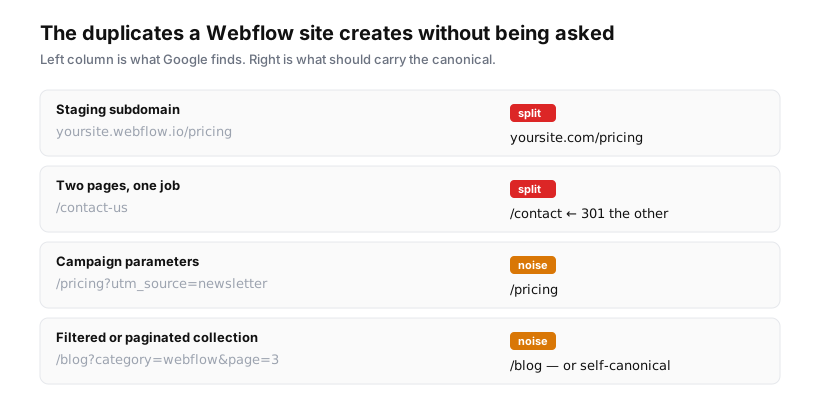
The second row is worth dwelling on because it's so common. Sites accumulate two pages for the same job — /contact and /contact-us, /pricing and /plans — usually because a page was rebuilt and the old one never deleted. Both get indexed, both are thin variations of each other, and they split whatever authority the topic has earned. The fix is a 301 from the loser to the winner, and the winner should be whichever URL your internal links already point at, because that's where authority is flowing.
Redirects: the migration tax nobody budgets for
Webflow handles 301s in Site Settings → Hosting. Two features do most of the heavy lifting:
Wildcards. A rule like /old-blog/(.*) → /blog/$1 catches an entire folder in one line. Webflow's own guidance is to prefer wildcards, and to treat roughly 1,000 rules as a practical ceiling — each rule is data the site carries around, and thousands of individual redirects have a real cost.
CSV import. Redirects can be bulk imported, up to 1,000 rows per file. For a migration with a few thousand URLs, split into batches.
A few things I'd argue for:
- Never blanket-redirect old URLs to the homepage. Google treats a redirect to an irrelevant page as a soft 404 and passes nothing. Redirect to the closest equivalent page, or return a genuine 404/410 and let it die cleanly. A clean 404 is a perfectly respectable answer for a page that no longer has an equivalent.
- Don't chain redirects. A → B → C wastes crawl budget and leaks a little authority at each hop. When you redirect B to C, go back and repoint A at C directly.
- Redirect to the canonical form. If your site is
https://www.example.com, don't redirect tohttp://example.comand let two more redirects sort it out.
Sitemaps
Webflow auto-generates a sitemap and updates it on every publish, adding and removing pages as they're created or deleted. For most sites this is the right choice — leave it on and don't think about it.
Two things to check regardless:
Reference it in robots.txt. A Sitemap: line costs nothing and gives crawlers a direct pointer:
User-agent: *
Disallow: /admin

Sitemap: https://example.com/sitemap.xml
Make sure it lists what you think it lists. Fetch /sitemap.xml and read it. Common surprises: a page you meant to exclude is present, a whole section is missing because indexing was toggled off during a redesign, or a URL appears twice under different paths — which is a duplicate-content problem announcing itself.
If you hand-maintain a sitemap, every duplicate in it is a page you're actively asking Google to treat as separate. Deduplicate before you submit.
What belongs in every page's head
None of this is exotic. It's just frequently absent, particularly on the commercial pages that matter most — pricing, product, contact — because those get built early and the metadata step gets skipped.
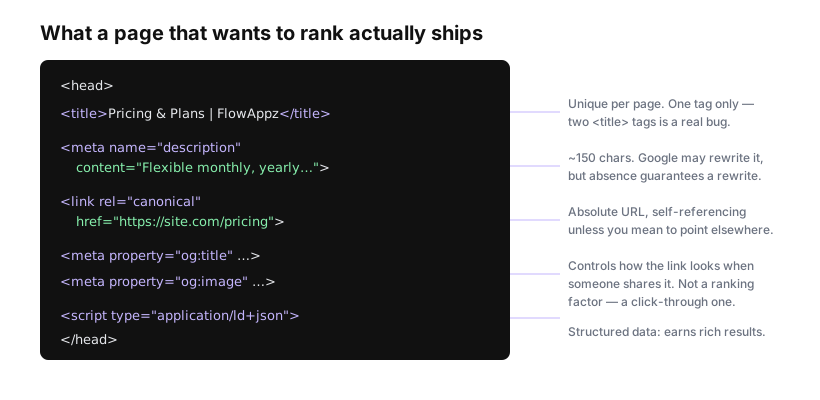
Specifics worth stating:
Titles. Unique per page, roughly 50–60 characters before truncation. Front-load the distinctive part. And ship exactly one <title> — if a template emits a hardcoded fallback alongside a dynamic one, some pages will serve two, which is a real bug that's easy to miss because browsers just use the first.
Meta descriptions. They aren't a ranking factor. They are a click-through factor, and Google rewrites them roughly half the time. Write one anyway: a page without one guarantees a rewrite, usually into a fragment of body text that reads like an accident.
Canonicals. Absolute URL, self-referencing unless you deliberately mean otherwise.
Open Graph. Governs how the link looks when shared. Not a ranking signal, but the difference between a shared link that gets clicked and one that looks broken.
Structured data. Webflow doesn't generate JSON-LD for you; add it via custom code. Article for blog posts, Product and Offer for pricing, FAQPage where you genuinely have Q&A. Don't mark up things that aren't there — invented FAQ markup is a manual-action risk, not a shortcut.
The mistakes I'd look for first on an audit
Ordered by how often they turn out to be the actual problem:
- Every page sharing one title. Usually a template that never got per-page metadata wired in. Twelve pages titled with just the brand name is close to a worst case: they compete with each other and tell Google nothing.
- No canonicals anywhere. Google guesses, and its guesses show up in Search Console as "Duplicate, Google chose different canonical than user".
- Staging subdomain indexable. An entire duplicate site.
- Old URLs 404ing after a redesign with no redirect map, dumping accumulated authority.
- Thin pages in the sitemap — template pages, demo pages, near-empty category archives. These are what "Crawled – currently not indexed" is usually made of, and they drag on how the site is assessed overall.
- H1s missing. Not fatal, and heading tags are weaker signals than they were a decade ago, but on a page where the hero headline is an
<h2>because it matched a design system, you're withholding the clearest statement of what the page is about for no benefit.
How to know whether any of it worked
Fix things, then wait. This is genuinely the hardest part.
Google recrawls on its own schedule. A metadata change on a well-linked homepage might be picked up in days; a deep page on a low-authority site can take weeks. Requesting indexing in Search Console for your most important pages nudges it along. Bulk-requesting for a hundred URLs does not.
Set a baseline before you start — export the Pages report so you have the "before" numbers — then re-export in two to four weeks and compare bucket by bucket. Watch the shape, not the daily wobble: is "Crawled – currently not indexed" shrinking? Are 404s trending down? Individual days mean nothing.
And be realistic about what technical SEO does. It removes obstacles. It gets your pages seen, correctly attributed, and eligible. It does not make a page worth ranking. If you fix every item above and traffic doesn't move, the problem was never technical — it's that the pages don't answer a question anyone is asking, and no canonical tag fixes that.
Sources: Webflow: canonical tags · Webflow: disable indexing · Webflow: 301 redirects · Google Search Central: robots.txt