









Bulk CMS Editor: scaling Webflow content ops without spreadsheet chaos
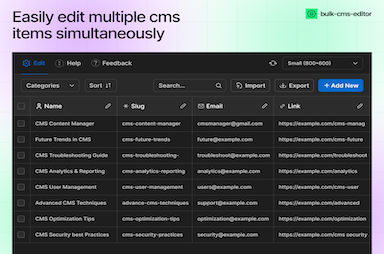
The pain arrives quietly
The first twenty CMS items feel fine in the Designer. At two hundred, small edits become a slog. At two thousand, someone exports to CSV, edits in Excel, and prays nobody fat-fingers a slug. That is when content ops debt shows up: stale metadata, inconsistent references, and “we will fix it next sprint” fields that never ship.
What bulk tooling should never break
- Slug discipline—renames have routing consequences.
- Reference integrity—multi-reference fields must not point at archived items.
- Publish intent—staging vs production edits need a clear story.
Good bulk editors make dangerous operations explicit and reversible where possible.
Search-first workflows
Editors should find rows by title, slug, tag, or arbitrary field text. Once filtered, bulk actions (set field, clear field, tag, export) should apply only to the filtered set. That pattern mirrors how marketers already think in spreadsheets.
Export and re-import as a contract with clients
Exports are not backups; they are handoff artifacts. Document encoding, required columns, and validation rules before clients edit CSVs. When imports return, run validation passes that surface row-level errors instead of failing silently.
FlowAppz Bulk CMS Editor
FlowAppz Bulk CMS Editor targets teams who live in Webflow CMS daily: bulk operations, search, and exports without leaving the ecosystem you already trust for layout.
Explore Bulk CMS Editor and pilot it on your messiest collection before you promise a client a “quick metadata refresh.”
Operating cadence
Weekly CMS hygiene—30 minutes with filters and bulk updates—prevents the quarterly panic. Treat collections like databases: owners, schemas, and review cadence.


