On this page
Separate the two problems first
"Not ranking" describes two completely different situations, and treating them the same wastes months.
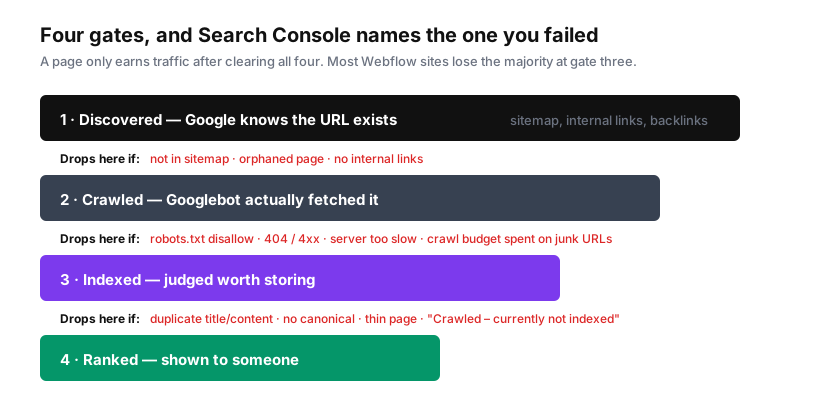
Not indexed means the page isn't in Google's index at all. Technical causes, technical fixes: noindex tags, robots.txt, canonicals pointing elsewhere, thin content Google declined to store.
Indexed but not ranking means the page is in the index and simply isn't competitive for the queries you want. That's rarely technical, and the technical work people reach for first — schema markup, meta tweaks, internal link plumbing — doesn't move it.
Check which you have. Search site:yoursite.com/your-page in Google. A result means indexed; the problem is competitiveness. No result means an indexation problem, and that's a different article.
The rest of this assumes it's indexed.
1. Confirm you rank for nothing, not just for that one term
Search Console → Performance → filter by page. Look at queries where the page already gets impressions.
Three possibilities, and they're not the same problem:
Impressions but low position (20–50). You're relevant and not competitive. This is the most fixable state — the page is understood, it just isn't strong enough.
Impressions for the wrong queries. Google understands the page differently from how you intended. That's a content and intent problem, not an authority one.
No impressions at all. Google doesn't consider it relevant to anything anyone searches. Usually the page targets a term nobody uses, or duplicates another page you already have.
That distinction determines everything below. Don't skip it.
2. Check you're not competing with yourself
Search site:yoursite.com plus your target keyword. If several of your own pages come back, you've split the topic.
This is common on Webflow sites that grew organically: a service page, a blog post and a landing page all covering the same ground. Google picks one — usually not the one you'd choose — and the others dilute it.
Fixes, in order of preference: consolidate into one strong page and 301 the others; or differentiate them clearly by intent, so the service page targets commercial intent and the blog post targets informational; or canonical the weaker ones to the strongest.
Consolidation almost always beats differentiation. Three mediocre pages on a topic lose to one good one.
3. Read the results you're losing to
Open an incognito window, search your target query, and actually read the top five.
This is the step people skip because it isn't technical, and it's the one that usually explains everything. Look at what format they are — listicle, tool, comparison, deep guide — and what specific questions they answer.
If the top five are all comparison tables and yours is a narrative essay, you've misread the intent. No amount of on-page optimisation fixes a format mismatch. Google is showing what searchers engage with; that's evidence, not opinion.
Also check depth. If the top results run 3,000 words with original data and yours is 600 words of general advice, that's your answer. Not because length ranks — it doesn't — but because length is a proxy for how completely each one answers the question.
4. Check the page targets one thing clearly
Look at your title, H1, first paragraph and URL. Do they all describe the same topic in the same words a searcher would use?
Common failures:
- Clever title, no keyword. "Beyond the Fold" tells Google nothing. "Above-the-fold design principles" does.
- H1 differs from title. Pick the phrasing and use it consistently.
- Buried topic. The first paragraph is throat-clearing and the actual subject appears in paragraph four.
- URL says something else.
/blog/post-27versus/blog/webflow-cms-limits.
None of this is a ranking hack; it's making the page legible. A page that isn't clearly about one thing struggles to be the best result for anything.
5. Check internal links
Search Console → Links → Internal links. Find your page.
A page with one internal link is telling Google it's peripheral. Your most important pages should be linked from your most visited ones, in body content — not just in the footer.
The fix is unglamorous and effective: find three or four existing pages genuinely related to the target, and link from their body text with descriptive anchor text. Not "click here", not the bare URL. The words in the link tell Google what the destination is about.
This is the highest-yield technical action available for most sites, and it's free.
6. Consider whether the domain can compete at all
Sometimes the honest answer is that the page is fine and the domain isn't strong enough for that query yet.
If you're a two-year-old site targeting a term where the top ten are all established publications with thousands of referring domains, you're not going to rank by improving your meta description.
That's not defeat, it's targeting. Go after the specific version of the query instead. "Webflow CMS limits" is contested; "Webflow nested collection list 10 item limit" is not, and the person searching it has a much clearer need. Win those, accumulate authority, then revisit the head term.
The order matters
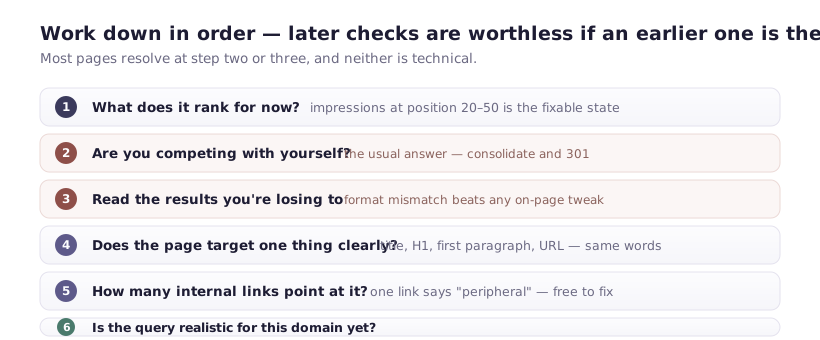
Work through in sequence, because the later checks are worthless if an earlier one is the real problem:
- Confirm it's indexed
- Check what it ranks for now
- Check for self-competition
- Read the competing results
- Check clarity of targeting
- Check internal links
- Assess whether the query is realistic
Most pages resolve at step 3 or 4 — either you're cannibalising yourself, or you misjudged what searchers wanted.
What to stop doing
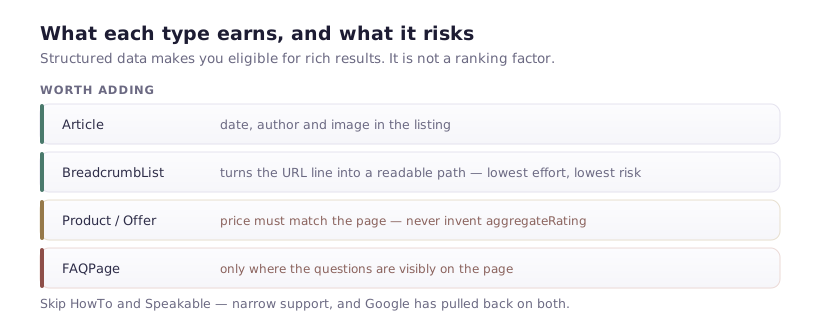
Adding schema markup to fix rankings. Structured data enables rich results. It's not a ranking factor and won't move a page that isn't competitive.
Rewriting meta descriptions. They affect click-through, not position, and Google rewrites them about half the time anyway.
Keyword density. Not a thing. Write for the reader.
Republishing with a new date. Changing datePublished without changing the content is transparent and achieves nothing.
Checking daily. Rankings fluctuate. Judge changes over four to six weeks, not four to six days. Making three changes in a fortnight also means you'll never know which one worked.