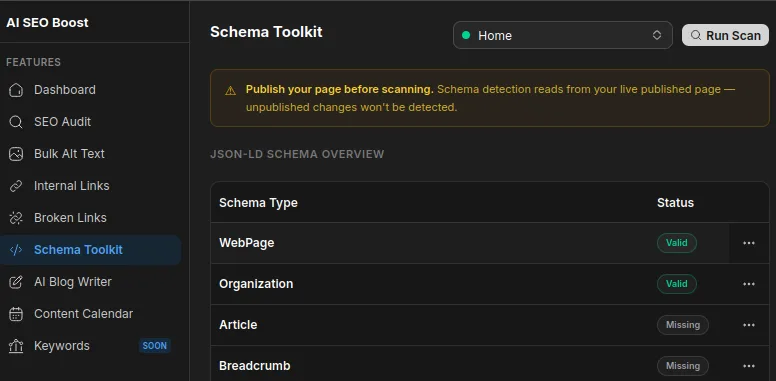
Schema Toolkit scans your published pages for structured data and helps you generate missing schema types. Supported types include Article, FAQ, Product, Local Business, Organization, Breadcrumb, How-To, Event, and WebPage.
Schema Overview
- Publish the page you want to scan in Webflow.
- Open Schema Toolkit, select a page, and click Run Scan.
- Review the results to see which schema types are valid, missing, or have warnings.
- Open a schema entry to view what was found on the page.
Generating & Applying Schema
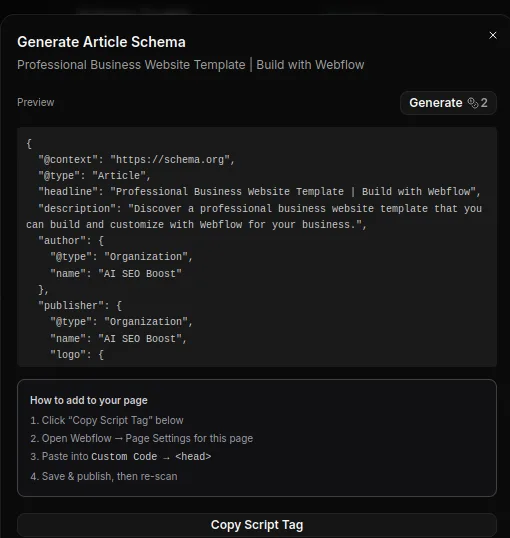
- For missing or incomplete schema, choose Generate, then copy the schema snippet and paste it into Page Settings under Custom Code in the head area.
- Publish the page again and re-run the scan to verify the update.