









Cookie consent in Webflow without brittle third-party scripts
Why cookie banners break on Webflow sites
Most teams start with a generic script tag: drop a snippet in Project settings → Custom code, publish, and hope the vendor’s JavaScript plays nicely with Webflow’s interactions, lazy-loaded images, and client-first navigation. In practice, you get flickering banners, double banners on template pages, and consent choices that do not reliably gate analytics or retargeting pixels. Maintenance is worse: every site uses a slightly different embed, so your agency playbook does not scale.
Webflow’s strength is that structure and presentation live in the Designer. When consent UI is “real” Webflow elements—sections, symbols, interactions—you can match typography, spacing, and breakpoints without fighting a third-party stylesheet. When blocking is handled by an app that understands your site, you reduce the number of moving parts that can fail after a Webflow update or a client experiment.
What “good enough” consent actually needs
Regimes differ, but almost every serious implementation shares the same engineering goals:
- Clear categories (essential, analytics, marketing, etc.) with plain language.
- Prior consent for non-essential processing where required, with a durable record of the choice.
- Script gating so tags do not fire until the visitor opts in.
- Regional nuance when you serve EU and US traffic from the same
.webflow.iopreview or production domain.
The banner is only the visible layer. The durable part is how scripts are registered, classified, and unblocked after consent. That is why a Webflow app that centralizes script placement and blocking tends to outperform a paste-and-pray snippet for teams shipping dozens of builds per year.
Designing the banner as part of the system, not an overlay
Treat the consent experience as a first-class layout problem:
- Use symbols for the bar, modal, and “manage preferences” surface so brand updates propagate everywhere.
- Align breakpoints with your grid: mobile sticky footers often need different padding than desktop top bars.
- Keep critical actions above the fold on small screens without blocking navigation.
If your tool exposes templates, start from the closest match and customize in the Designer rather than overriding CSS in the embed. Fewer overrides mean fewer surprises when the client changes the global color palette next quarter.
Script blocking: where FlowAppz Cookie Consent fits
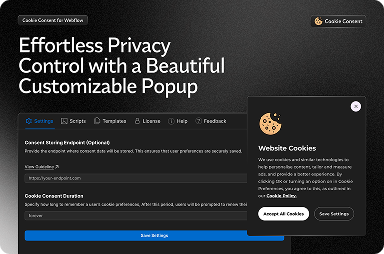
FlowAppz Cookie Consent is built for Webflow: install from the app marketplace, configure categories, and attach third-party scripts through the app so they stay blocked until consent is granted. Compared to dropping tags in the head or footer blindly, you get a single place to audit what runs on production.
For agencies, the payoff is operational: your build checklist can say “install Cookie Consent, map GA + ads + heatmaps,” instead of maintaining a spreadsheet of per-client GTM containers with bespoke triggers.
Checklist before you hand off a client site
- Inventory every marketing and analytics tag the client expects; nothing should load “accidentally” from an old clone.
- Test deny-all in an incognito window: verify network tab shows blocked requests for non-essential categories.
- Test allow-all and confirm conversions still fire where the client cares.
- Document where the privacy policy and cookie policy links live in Webflow, and keep them reachable from the banner.
When to choose a Webflow app over a generic CMP
If the site is Webflow-first, designers iterate weekly, and you need predictable behavior across staging and production, a Webflow-native flow usually wins. Generic CMPs can be powerful, but they often optimize for enterprise marketing stacks, not for a studio that needs five polished builds shipped before month-end.
FlowAppz Cookie Consent is aimed at that Webflow-native workflow: less custom JavaScript, more control inside the Designer, and a clearer story for clients who want compliance without a science project.
Next steps
- Explore the Cookie Consent product page and your internal docs for installation specifics.
- Pair this app with a written cookie policy your legal counsel approves—software does not replace legal advice.
If you standardize on one Webflow-native consent stack across clients, support tickets go down and launches get faster. That is the real ROI.


